
Updated 15 October 2026 · Global. The official coupon notice was rechecked. This page distinguishes a confirmed expired coupon from any new coupon that has not been verified.
TAKEFLIGHTAION2 is expired. The publisher's notice sets its cutoff at October 13, 2026 at 23:00 PDT / October 14 at 08:00 CEST. No replacement active Global code has been verified for this update. Do not spend time trying this expired coupon or apply Korean and Taiwanese coupons to Global without a separate Global announcement.
AION 2 code status for October 2026
| Code | Status on October 15 | Announced rewards | Published cutoff |
|---|---|---|---|
TAKEFLIGHTAION2 | Expired | Odyle Energy (Bound) ×4; Resurrection Spiritstone (Bound) ×5; Battle Enhance Scroll (Bound) ×10 | October 13 at 23:00 PDT / October 14 at 08:00 CEST |
The official coupon notice still contains the original deadline. An older search snippet calling the code active does not extend that deadline. A new coupon needs its own publisher notice with a Global service scope, reward list and expiration before it belongs in the active list.
Where to check a new Global coupon
Open the official Global announcements and read the full coupon notice. Check the service region, expiration time, eligible servers, account limit and reward delivery before redeeming. The existence of a coupon field in the client does not prove that a particular code is usable.
Twitch Drops have a separate account-linking and claim process. Already claimed Odyle Energy items are also separate from whether an expired coupon can still be entered.
How the documented in-game redemption menu works
The original Global notice uses Settings > Miscellaneous > Account > Enter Coupon. Follow the current notice if a later coupon changes this route. These steps explain the menu; they do not make TAKEFLIGHTAION2 active again.
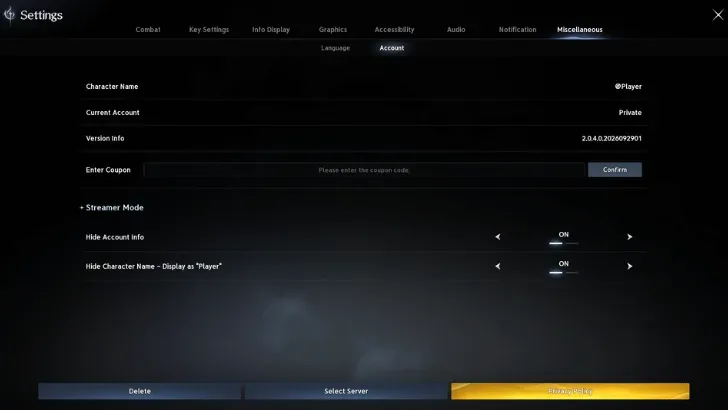
- Log into the intended Global account and select the receiving character.
- Check that the character's Cube has room for the announced rewards.
- Open Settings, then Miscellaneous, then Account.
- Enter a currently valid, officially announced Global code in Enter Coupon.
- Confirm only after checking the reward preview and recipient.
- Inspect the receiving character's Cube to verify delivery.
The expired launch coupon was restricted to one redemption per account and its items were bound. Do not assume that another character or server resets the account's claim. Apply the conditions in the notice for each future coupon rather than treating the launch terms as a universal rule.
If a coupon is rejected
| Situation | What to check | Useful next action |
|---|---|---|
TAKEFLIGHTAION2 is rejected | Its published deadline has passed | Stop retrying this expired code; check official announcements for a different verified coupon |
| A newly announced code is rejected | Global region, exact spelling and expiration | Compare the whole string and service scope with the publisher notice |
| The account already redeemed that code | The notice's account limit | Check the character that received the first claim; a different server does not establish a new claim |
| The client reports a full Cube | Inventory space | Clear space and retry only if the code remains valid and the original claim did not complete |
| Rewards are missing after a successful claim | Receiving character and delivery method | Inspect the Cube or other destination specified by that coupon's notice |
| An old Korean or Taiwanese coupon fails | Regional applicability | Use a separately confirmed Global coupon |
A full-inventory message, an expired-code message and an already-redeemed message represent different problems. Repeating Confirm does not fix the latter two. Keep the successful claim message and reward preview when contacting official support about delivery.
Reward history and later use
The launch coupon's four bound Energy items were consumables, not four guaranteed dungeon clears. A character still has to use the item according to its current tooltip and pay the actual reward-cube cost. The resurrection stones and enhancement scrolls were also consumable rewards; their presence in an old code table is not proof of a current offer.
If the code was redeemed before the deadline, check the receiving character for remaining items. The coupon deadline does not by itself establish a separate expiration date for items already received. Read their own tooltip before using them.
Sources and verification
Reviewed on October 15, 2026 for Global. The published cutoff is confirmed in the original official notice. No replacement coupon or extension is claimed here.