
AION 2 Global server transfers are scheduled for later in October, not active on October 10. Early Access starts after October 13 PDT maintenance; launch servers start after October 20 PDT maintenance.
Open the announced transfer terms and requirements.
A transfer can bring your characters to an eligible server, but it is not a faction change or a route between regions. Decide where you want to move, which characters should go together, and what remains on the departure server before applying. The announced transfer is limited to once per account during the whole period and cannot be reversed after the request is completed.
Match your server to the correct week
The announced service has two separate windows. Early Access servers use the first week; launch servers use the second. A general headline saying October 14 does not mean every server is eligible at that moment.
| Server group | Opening boundary | Closing boundary |
|---|---|---|
| Early Access | After October 13 PDT / October 14 CEST regular maintenance | Before October 20 PDT / October 21 CEST regular maintenance |
| Launch | After October 20 PDT / October 21 CEST regular maintenance | Before October 27 PDT / October 28 CET regular maintenance |
The maintenance boundary matters. These dates are not a promise that the service begins at midnight. Plan around the completed maintenance and the daily application hours for your region, then inspect the transfer interface when that window actually opens.
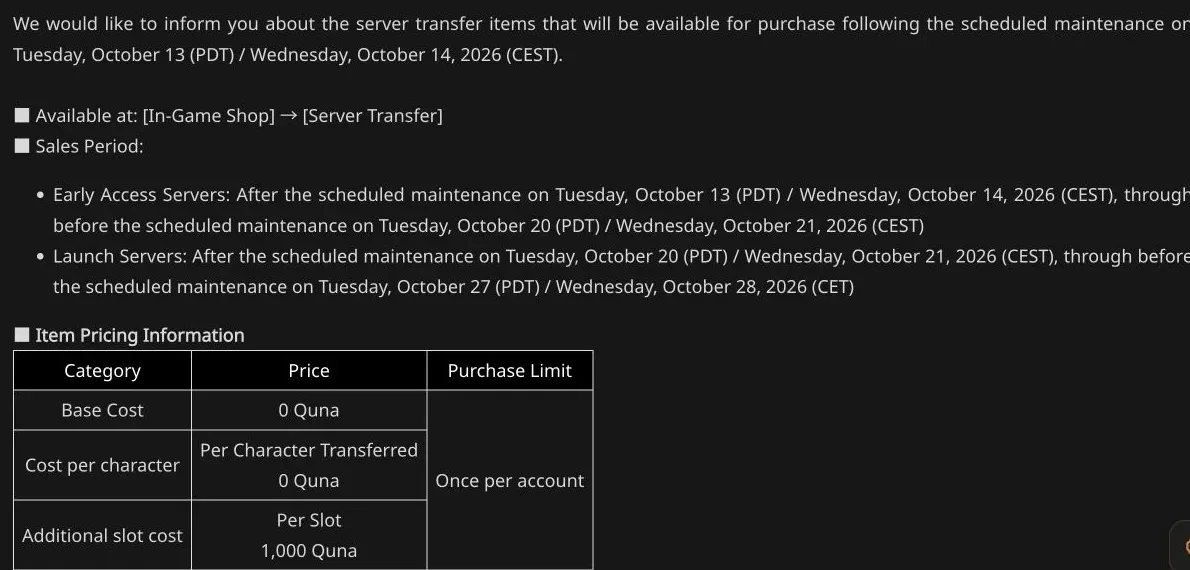
The base move is free; additional destination slots have a separate cost.
As of October 10, this is preparation for an announced future service. If the shop does not offer a working transfer now, that does not establish that your character has failed eligibility. The opening date has not arrived.
Check region, faction, and server group first
Transfers are restricted to the same region and faction. An Elyos character cannot use the service to become Asmodian, and moving between North America, Europe, Asia, or another region is outside the announced same-region rule.
Early Access transfers are restricted to other Early Access servers. The first and second week structure separates Early Access and launch participation. Identify your current server group before arranging a move with friends.
A destination also needs transfer capacity. The departure server has an outbound limit, and the destination has an inbound limit. Either limit can make a move unavailable even when every character requirement has been satisfied.
Already owning a character on the destination does not exempt you from these limits. Confirm the server offered by the actual transfer UI instead of assuming that an existing character guarantees another transfer slot.
Distinguish free transfer from paid extra slots
The announced base cost and cost per transferred character are both 0 Quna. Additional destination character slots cost 1,000 Quna per slot when needed. Therefore, free transfer does not mean every possible destination configuration has no additional charge.
Count the characters you want to move and the slots available at the destination. If six characters are moving and only four destination slots are available, the announced example requires two additional slots, costing 2,000 Quna.
Purchased character slot expansions on the departure server remain there. They do not simply travel with the characters and increase destination capacity. The destination uses its own available slots and the expansions applied there through the service.
If you select more characters than the destination's maximum expandable capacity can support, the application cannot proceed. Resolve the character group and slot plan before reaching the final confirmation rather than discovering that your planned move does not fit.
Use the application hours for your region
The service is available during specific daily application hours within the appropriate transfer week. Being inside the overall sales period is necessary but does not make the service available throughout the day.
| Region | Announced daily application hours in PDT |
|---|---|
| North America East | 09:00–13:00 and 15:00–19:00 |
| North America West | 09:00–13:00 and 15:00–19:00 |
| Europe | 03:00–07:00 and 09:00–13:00 |
| South America | 09:00–13:00 and 15:00–19:00 |
| Asia | 20:00–00:00 the next day and 02:00–06:00 |
Use the region row that belongs to your game service. An Asia player should not copy the North America application hours merely because a guide displays those hours first. When converting to your local clock, preserve the date change in the Asia overnight window.
The announcement supplies European clock labels that change at the late-October boundary. Use the exact current notice and in-game availability for a local-time decision; this guide does not invent a corrected universal conversion where the notice itself uses differing labels.
Satisfy the character requirements
Eligible characters must be level 10 or higher on the same departure server. The applying character must stand in a village, not inside the Abyss, a Spacetime Rift, or a dungeon.
The character must not belong to a Legion or have a pending Legion application. It must also have no active Duty Missions. These are preparation conditions, so clear them before the application period rather than treating the shop's unavailable message as an unexplained failure.
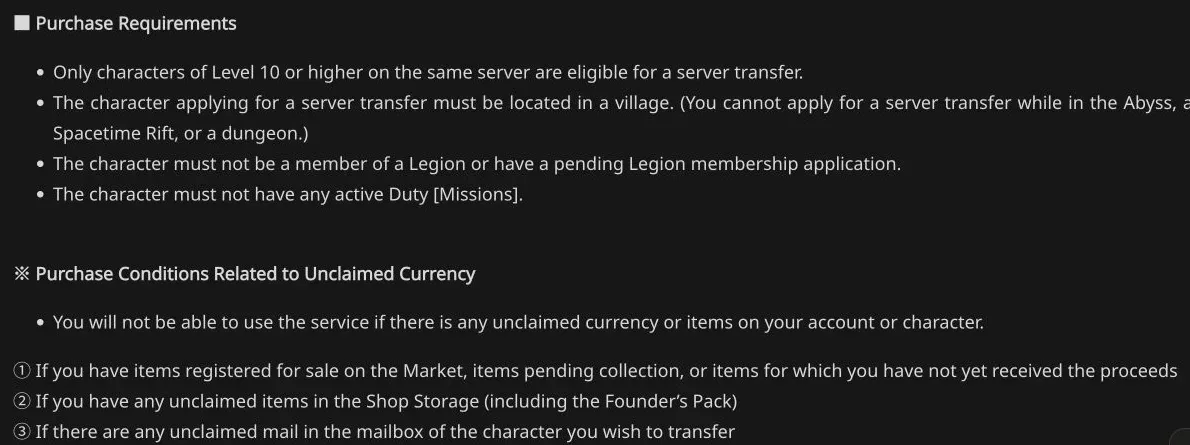
Prepare these conditions before applying during the regional window.
Unclaimed currency and items can also block the service. Inspect Market listings, pending collections, and uncollected proceeds. Check Shop Storage, including a Founder's Pack if it remains there, and the transferring character's mailbox.
Finish this preparation while leaving time to inspect the result. If you are moving several characters, review the relevant character state deliberately. The fact that your main character is ready does not establish that every selected character meets the service's conditions.
Move Server Storage contents yourself
Character Storage and its stored items travel with the character, including purchased Character Storage expansions. Server Storage works differently: the items inside it do not transfer.
Before applying, move anything you intend to take from Server Storage into the transferring character's Cube inventory or Character Storage. The same distinction applies to Kina. Kina in the transferring character's inventory and Character Storage travels; Kina left in Server Storage does not.
Server Storage expansion records are handled separately from contents. The destination receives the higher expansion count between the current and destination server. That does not move the actual items or currency stored in the departure Server Storage.
Inspect storage after packing. A familiar expanded storage interface can make it easy to overlook a remaining stack or currency balance. The preparation is complete only when the possessions you intend to move are in a transferable location.
Consider characters that remain behind
Moving only some characters has consequences for shared collections. Pets and Skins transfer to the destination and are removed from the departure server, so remaining characters can no longer equip those transferred Pets and Skins there.
This makes a partial transfer more than a private move for one character. Review which shared benefits your remaining characters use. If you intend to continue playing them regularly, understand the loss before deciding that they can simply remain unchanged.
Genus Insight also requires a choice between current-server and destination-server progress. The current server's Genus Insight is reset regardless of which progress you select. Do not assume that both completed paths merge into one larger total.
Titles and achievements have character and server behavior described by the service. Treat the specific collection category carefully rather than extrapolating one rule to every progression system. The central decision is whether your whole account plan matches a transfer whose shared data can leave the original server.
Know what continues and what does not reset
Membership transfers to the destination, combines with an existing membership there, and is removed from the departure server. Daeva Pass progress travels with the character. Quna and Mileage on the current server transfer and are added to the destination amounts.
Dungeon reward information and remaining claim counts travel with the character, including progress toward guaranteed rewards. Character-specific usage information such as Abyss and Rift time also carries over. A transfer is not a fresh allowance for every activity.
Purchase limits remain meaningful. Character-based purchase counts carry over, and server-based Coin Shop counts use the higher accumulated count from the two servers. Moving does not create a new opportunity to buy the same limited item simply because the destination previously had a lower count.
Style Shop creations remain available for downloading, applying, and settlement. Their displayed creator name and server stay as they were when the style was created. Character movement and the historical identity attached to a published style are therefore different records.
Prepare for renaming and completion
Every transferred character is assigned a temporary name, regardless of whether the original name conflicts with a destination character. You choose a new name on first login after the transfer. If the original name already exists there, you cannot reclaim it through this process.
Friends and Blocked lists are retained, and your friends' lists update to the newly selected character name. Agree on how your group will identify each other after moving, especially if a familiar name is unavailable.
When the transfer starts, the account returns to the title screen and cannot log in while processing. Completion takes at least a minute and can take longer with request volume. PURPLE users receive a push notification on completion according to the announced service.
Do not treat the minimum duration as a deadline that guarantees an error afterward. The service may temporarily restrict transfers for stability, and capacity can change while other players apply.
Make the final confirmation deliberate
During the correct region's application hours, use In-Game Shop, then Server Transfer. The purchase button becomes available when the conditions are met, subject to server capacity and service timing.
Before completing the request, verify the exact destination, selected characters, destination slot count, displayed cost, packed storage, and effect on characters staying behind. The service permits one transfer per account during the entire period, from one server to another, without a character-count limit beyond the applicable requirements and capacity.
The completed request cannot be canceled or reverted. Use that final screen to confirm the actual move you intended, rather than relying on a conversation from several days earlier. If the destination or character group no longer fits your plan, stop before confirmation and reassess.
A good transfer outcome is specific: the eligible characters arrive on the intended server, your transferable possessions are packed correctly, and you understand what shared progression leaves the original server. That preparation is more useful than clicking as soon as a free transfer headline appears.
Sources and verification
Reviewed for Global on October 10, 2026. The Global publisher notice and its Steam announcement govern the transfer requirements. The October transfer windows are still upcoming on this review date; the listed time zones follow the notice.
- [Notice] Server Transfer Products Info Oct 13 (PDT) / Oct 14 (CEST) : AION 2-NC
- AION 2 - Information on server transfer - Steam News