To join Dimensional Invasion, watch the activity timer beside your map around half past each hour and enter during the short registration countdown. The event can appear in Verteron or Altgard; do not travel to a fixed spot expecting the same invasion every time. Check your Dimensional Invasion Reward Keys before entering; the guide-listed entry requirement and the later reward-card confirmation are separate checks.
The timetable below is reported by the Global English Questlog timer and Game8's October 9 guide, checked on October 20, 2026. It is a planning reference, not a live countdown or a guarantee that an event is running during maintenance. Exact entry eligibility and reward-card options should be read from your current client.
Catch the entry window
Questlog's Global English schedule describes a three-minute lobby followed by ten minutes of invasion play. Game8 independently describes the hourly :30 start and entering through the timer beside the map.
| Part of the window | Planning reference | What you should do |
|---|---|---|
| Registration | Starts at :30 each hour and lasts three minutes | Open the activity timer beside the map and use the entry control during the countdown. |
| Invasion | Follows the lobby and runs for ten minutes | Follow the active encounter and its objectives. |
| The next hour | A new :30 window | Check the new event rather than assuming the previous variant and location repeat. |
Select the timer’s matching region and timezone, then compare its next window with your in-game countdown. A captured “starts in 11 minutes” value is not a live timer.
The schedule groups Beritra Air Raid, Accursed Sword, and Incursion of the Spirits under Dimensional Invasion. Questlog describes one of these appearing at a random location in Verteron or Altgard, with the variant known once it starts. The names identify possible events; they do not establish a fixed daily rotation.
Join and play the active objective
- Before the next window, check the activity timer and your reward-key inventory. Leave enough time to open the entry panel when registration begins.
- During the three-minute countdown, select the timer beside the map and enter the activity. If entry is unavailable, read the actual message; do not spend unrelated portal or event keys trying to bypass it.
- Once inside, identify the variant and the objectives it presents. Game8 describes points as based on damage dealt to objectives, so direct your combat effort at those objectives.
- Review the result and reward-selection screen before accepting cards. Participation progress, your point total, and the rewards you choose are different things to check.
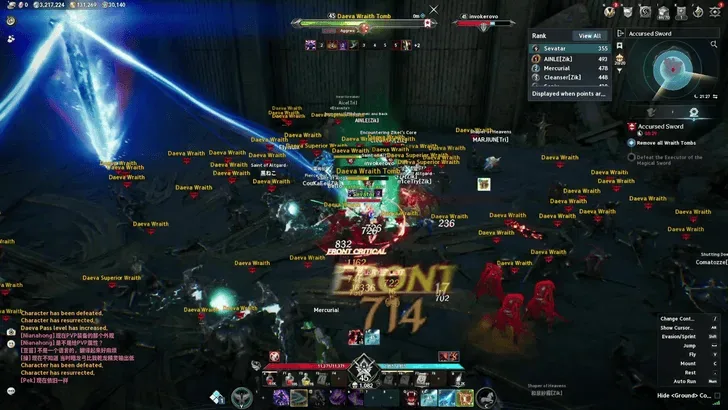
The Accursed Sword example shows active objectives and the event ranking panel; it is not a guaranteed score route.
Use skills that deal damage to the active objectives if you want to improve your score. That does not guarantee a rank or require a particular class. Read the active encounter rather than applying one boss sequence to all three variants.
Confirm rewards before spending a key
Game8's Dimensional Invasion guide lists a Dimensional Invasion Reward Key as an entry requirement. It describes the key being consumed after you choose reward cards, and says cancelling that selection does not consume it. Check the entry panel and the current reward confirmation for the item and quantity; this consumption behavior has not been independently reproduced here.
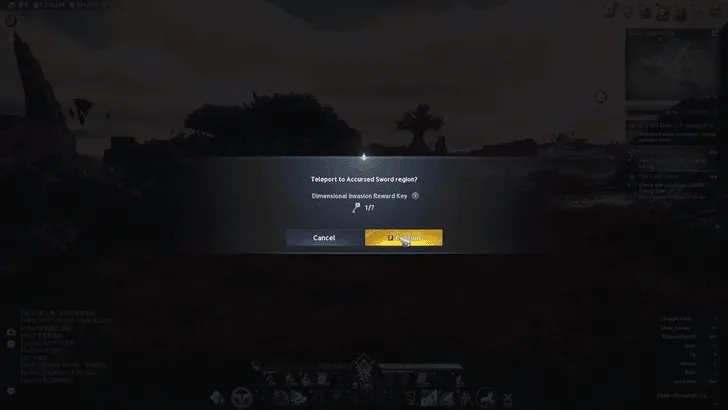
The entry prompt identifies the required key. Check the current client before confirming.
The guide describes equipment of different rarities, gathering materials, and currency usable for growth materials or skins through the Shugo Festival trade shop. Check the currency named in the reward preview before planning a purchase. No complete guaranteed-drop table or per-rank odds are established here; a high point total does not promise a named item.
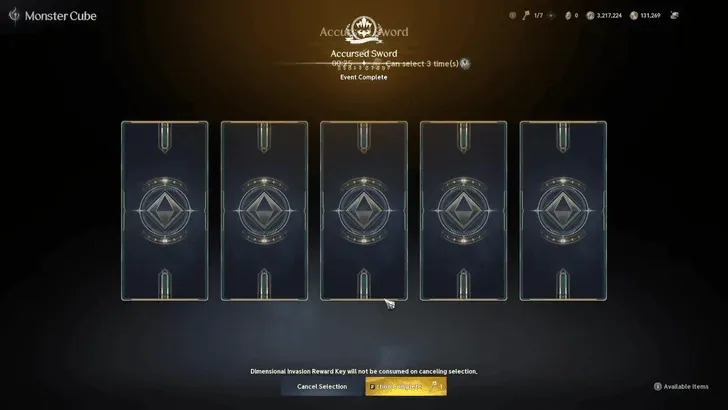
The pictured message says cancelling selection does not consume the reward key; inspect the confirmation before choosing.
Do not substitute a Hidden Cube Key, Candy Key, or Abyss Rift Stone for the item requested on this screen. Similar event names and currencies are not interchangeable instructions.
Claim the Halloween participation mission separately
The official October 13/14 Global patch notes list an event mission under Season Mission → Event: participate in Dimensional Invasion once to earn 20 Halloween Pumpkin Coins. The mission table gives a reset limit of once per week per server.
This is a limited Halloween mission reward, separate from the activity's ordinary reward cards. Its wording is “participate,” rather than a requirement to win first place. Check the mission's completion and claim state after your run, and use the Halloween guide for regional dates, shop limits, and the other coin sources.
Repeating the activity does not award another 20 mission coins after that server’s weekly mission has been claimed. Mission completion also does not confirm that you accepted an ordinary reward-card choice.
Track repeated participation through Dimension Defender
The Wikily achievement record lists Dimension Defender as an Exploration → Field achievement for both factions. Its eight participation milestones are:
| Step | Total Dimensional Invasion participations listed |
|---|---|
| I | 3 |
| II | 10 |
| III | 30 |
| IV | 60 |
| V | 100 |
| VI | 150 |
| VII | 200 |
| VIII | 300 |
The record lists Title: Welcome at step V, 100 participations, and Title: Alien at step VIII, 300 participations. Check the matching entry in your current client before committing to a title grind; these are database-listed milestones rather than independently tested regional reward claims.
If the participation counter advanced but an expected reward is absent, inspect its achievement or mission claim state before repeating the activity.
Continue with the matching activity
- Halloween event rewards and limits — plan the limited Pumpkin Coin mission and purchases.
- Abyss entry and activities — understand the separate contested zone and its entry allowance.
- Spacetime Rift guide — plan Rift travel without confusing its portal window with Dimensional Invasion.