Source review: 7 October 2026 · Global. Reward-budget advice is editorial. Read the current claim prompt, recovery meter and item tooltip before spending; regional regeneration rates and recharge amounts are not independently confirmed here.
The direct answer is that you get Odyle Energy through passive recovery, Substance Morph crafting, and Odyle Energy items awarded by systems such as the Daeva Pass or current events. Some membership and shop options may provide additional items when they appear in your account. The official launch coupon awards Odyle Energy (Bound) ×4. Each item's recharge amount and use requirement should be read from its current Global tooltip; this review did not independently confirm the earlier recharge / level-20 figures.
Odyle Energy is not an Expedition entry ticket. It is the resource spent when you activate the personal reward cube that appears after eligible Expedition, Transcendence, or Sanctuary clears. Check both your available entry and your Energy before starting content if receiving the final reward is your goal.
Exact passive recovery rates, maximums, shop limits, and membership bonuses should be read from the current Global client. Published figures differ across regions and builds, so your in-game meter and item descriptions are the reliable values for your character.
For the next decision, use the level 45 progression route, the matching upgrade checklist, and Daevanion priorities.
What Odyle Energy does
Odyle Energy controls whether you can claim certain personal end-of-run rewards. After completing an eligible activity, the game presents an Odyle Energy Cube. Activating that cube consumes the amount displayed on the reward prompt. If you do not have enough Energy, completing another run does not solve the shortage; you need to recover Energy or use a recharge item before you can make another claim.

The important distinction is between clearing content and claiming its Energy-gated reward. Energy is used at the cube, not simply because you entered the activity. That means you should inspect the reward cost before committing limited Energy, especially when several unlocked activities are competing for the same pool.
Odyle Energy is character-specific. Another character can have its own reserve, but that does not refill the main character’s meter. Treat each character as a separate budget instead of assuming the account has one shared balance.
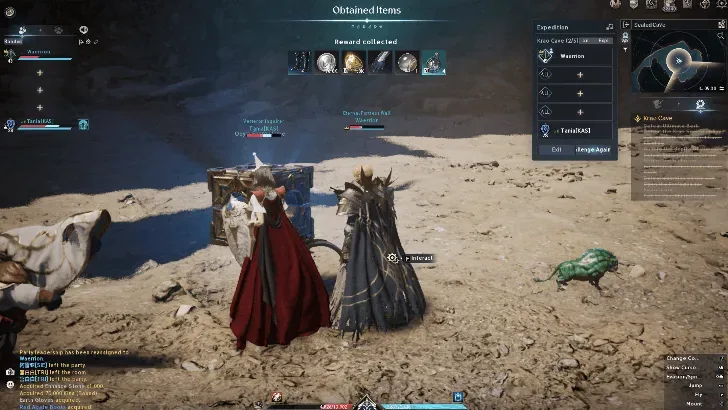
The Expedition completion screen shows where the Odyle Energy reward claim appears.
The recharge consumable is also a separate object from the live meter. Receiving one does not necessarily mean the meter increased immediately: locate the item in your inventory and use it when you want to convert it into Energy. Because the item is bound, do not plan around selling or freely moving it to another character.
Reliable ways to get more Odyle Energy
| Method | What to do | Important limitation |
|---|---|---|
| Passive recovery | Leave the meter below its displayed cap and allow it to recover over time. | Recovery stops providing value while the meter is full. Confirm the current rate and cap in your own Global client. |
| Substance Morph | Open Substance Morph, find the Odyle Energy recipe, verify its materials and limit, then craft the recharge item. | Recipe materials and any crafting restriction must be checked in the live recipe instead of copied from another region. |
| Daeva Pass rewards | Review both visible Pass tracks and claim completed stages that show the Odyle Energy item. | A reward on a later stage is not available until that stage is completed, and premium-track rewards require the applicable track. |
| Current events | Check the active event page, event missions, and event trader for the Odyle Energy item. | Event currencies, purchase limits, and availability expire or change. Do not plan around an event that is no longer visible in the client. |
| Special or membership options | If your active membership exposes an Energy item in the Special shop, inspect its price and weekly limit before buying. | Availability depends on the current entitlement and shop rotation. Membership is not a reason to assume unlimited Energy. |
| Recharge items already owned | Search your inventory and unclaimed reward panels for Odyle Energy (Bound), then use the quantity you need. | Each eligible item restores the amount listed on its tooltip and has the use requirement shown on its tooltip. Using several at once can leave you near the meter limit, so check the displayed total first. |
Check recovery on the live meter and the Odyle Energy recipe if it is available to your character. Pass and event rewards are supplements: useful when available, but not dependable enough to replace a regular recovery plan.
Craft Odyle Energy with Substance Morph
Use this sequence when you want Energy immediately and have access to the recipe:
- Open the Substance Morph interface. Look for an Odyle Energy entry rather than a similarly named crafting material.
- Read the recipe output. Confirm that the result is the bound Odyle Energy consumable that restores the amount listed on its tooltip.
- Check the listed ingredients and remaining allowance. Use the live recipe values because material requirements and limits can change between versions.
- Compare the meter with your next cube cost. Craft only enough items to cover the claim or claims you actually intend to make.
- Complete the morph. Confirm that the item arrived in your inventory rather than assuming crafting changed the meter directly.
- Use the consumable. The item must be consumed to add its the amount listed on its tooltip to the character’s current reserve.
- Recheck the meter before entering content. Make sure both the Energy and the separate activity entry requirement are available.
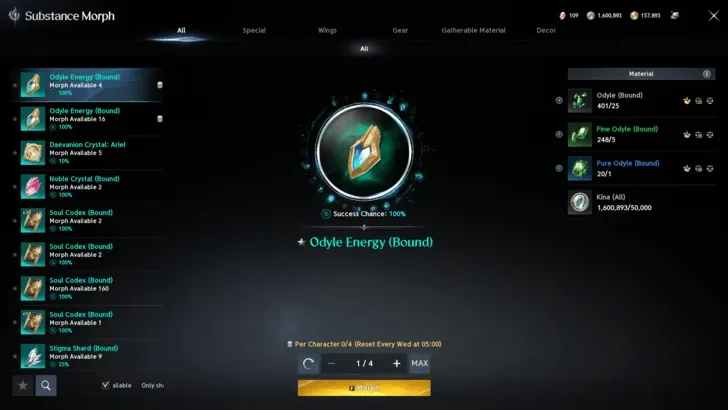
The selected recipe and required materials are visible in the Substance Morph interface.
Do not confuse Odial with Odyle Energy. Odial may appear among the resources involved in crafting, while Odyle Energy is the final stamina-like resource used on reward cubes. If you gathered or earned Odial but your Energy meter did not move, nothing is broken: open Substance Morph and inspect whether that material can be turned into the Energy item through the recipe currently available to you.
Crafting one item gives a predictable recharge increase, but that does not prove every cube has the same cost. Always compare the cube prompt with your remaining balance. If the prompt supports more than one reward-consumption option, read the total cost before confirming rather than assuming one item covers every choice.
Claim Pass and event Energy correctly
A completed Pass stage or event objective may place a reward in a claim panel instead of directly in your inventory. When your meter seems unchanged, open the relevant page and look for an unclaimed marker. Claim the reward, check the character’s inventory, and then use the bound item.
For the Daeva Pass, inspect the reward icon and track before planning around it. Odyle Energy can appear at multiple Planet’s Call stages; use the stage layout visible to your character. A premium-track item is not part of the free track merely because both tracks appear on the same screen.
Event traders can also stock the item for event currency with a weekly limit. Treat this as an opportunistic source rather than a permanent one. Before farming currency, verify all three details in the current event shop:
- The item is actually Odyle Energy (Bound).
- The event is still active and the trader is accessible.
- You can earn enough of the displayed currency before the event or weekly limit resets.
Avoid copying an old trader price or schedule into your budget. Event stock can disappear, and an expired activity cannot be treated as a current Energy source.
Keep Energy, entries, and rewards separate
Several counters can block the same run, but they are not interchangeable. A character may have plenty of Energy and no entry ticket, or an available entry and too little Energy to claim the cube. Check each requirement independently.
| Counter or item | Its role | What it does not do |
|---|---|---|
| Odyle Energy meter | Pays the displayed cost to activate an eligible reward cube. | It does not automatically grant an Expedition or other activity entry. |
| Odyle Energy (Bound) | Adds the amount listed on its tooltip when used by a character meeting its current use requirement. | Merely owning it does not guarantee the meter has already increased. |
| Activity ticket or attempt | Allows entry where that content requires one. | It does not pay the Energy cost of the final reward cube. |
| Odial and other morph materials | Can be used where listed in Substance Morph recipes. | They are not the spendable Energy shown on the reward prompt. |
| Reward cube | Presents the personal claim after an eligible clear. | Clearing the encounter does not make the cube free to activate. |
This separation explains the most common apparent contradiction: having enough tickets does not mean you have enough Energy, and having a full Energy meter does not guarantee you can enter every activity.
Spend Energy without blocking your next reward
Odyle Energy is limited, so decide what reward you are pursuing before opening a cube. Expeditions can provide gear rewards, while Transcendence is associated with Arcana rewards. Sanctuary also uses Odyle Energy for its eligible reward cube. The best choice depends on the upgrade your character currently needs; this page does not assume that one activity is always best for every build.
Use a small budget before a session:
- Record the Energy currently shown on the character.
- Count unused recharge items in the inventory and claim panels.
- List the eligible cubes you intend to open in priority order.
- Read each displayed cube cost in the live client.
- Reserve enough Energy for the highest-priority claim before spending on optional repeats.
- Stop opening lower-priority cubes when the remaining balance reaches that reserve.
While leveling, avoid repeatedly spending Energy merely because a cube is available. Equipment obtained during progression may be replaced, whereas later activities can offer rewards relevant to endgame growth. However, hoarding at the displayed passive cap also wastes future recovery. If you are capped for a long period, make a useful claim to create room for natural regeneration rather than leaving the meter permanently full.
Do not activate a cube automatically after every clear. Pause at the reward screen, confirm the loot category and Energy cost, and decide whether that claim matches your current goal. This habit matters more than memorizing a fixed weekly plan that may become outdated.
Continue progressing when Energy is empty
Running out of Energy means you cannot claim another eligible Energy-gated cube until the meter recovers or you use a recharge item. It does not mean the entire character is unable to progress.
First, complete the recovery checks: look for an unused bound item, an unclaimed Pass stage, an active event reward, or an available Substance Morph recipe. If none is available, allow passive recovery instead of repeatedly clearing content solely for a cube you cannot activate.
You can then shift the session toward activities whose reward screens do not ask for Odyle Energy. The exact available activities depend on what the character has unlocked, so confirm the reward prompt rather than assuming every dungeon, daily activity, or open-world task uses the same resource. Gathering, crafting preparation, and other non-cube goals can keep a session productive while the meter recovers.
An alternate character’s separate reserve does not refill the main character. Leveling and preparing an alt also costs time, so it should not be presented as an instant solution to an empty main-character meter. Use another character only when its own progression and rewards already fit your goals.
Fix an Odyle Energy total that is not increasing
Work through these checks in order:
- Confirm you are viewing the intended character. Energy is character-specific, so another character’s total is not evidence that the main character should have the same amount.
- Check whether the meter is full. Passive recovery cannot add useful Energy while the character is already at the cap displayed by the client.
- Inspect the inventory for the bound item. A claimed Pass, event, shop, or crafted reward may still need to be consumed.
- Confirm the item requirement. The recharge item has the use requirement shown on its tooltip.
- Distinguish the item from crafting material. Odial or another recipe ingredient does not directly increase the Energy meter.
- Check claim panels. Pass and event rewards may remain unclaimed even after their objective or stage is complete.
- Read the current entitlement screen. If you expected a membership benefit, confirm that the relevant membership is active and that the option is actually present for your account.
- Use the current client values. Do not diagnose a problem by comparing your meter with an old regional cap, regeneration rate, price, or weekly limit.
- Reopen the relevant menu after using an item. Verify the new total before entering another Energy-gated activity.
If Energy decreased after a clear, inspect whether you confirmed a reward-cube activation. The resource is tied to that claim, so the deduction may be the expected result rather than an unexplained loss.
A simple Odyle Energy routine
At the start of a session, check the live meter, the passive cap, and your inventory of recharge items. Claim completed Pass or event rewards, but leave consumables unused until you know how much Energy the planned cubes require. Open Substance Morph and craft only the amount justified by those plans.
Before an Expedition, Transcendence, or Sanctuary run, verify both the activity entry and the Energy needed for the desired cube. Put the most important claim first, then use any remaining budget on lower-priority rewards. If the meter is close to its displayed cap, spend enough to make room for timed recovery; if it is low, preserve the balance for the upgrade you actually need.
When the budget is exhausted, stop chasing Energy-gated cubes and switch to objectives that do not display an Odyle cost. Repeat the checks after the meter has recovered or after obtaining another recharge item. This keeps Odyle Energy tied to deliberate reward claims instead of letting entry tickets, temporary event offers, or automatic cube openings decide the character’s progression plan.
Sources and verification
- Official TAKEFLIGHTAION2 coupon notice — Official: coupon rewards, redemption path and deadline.
- AION 2 Global launch FAQ — Official: platforms, shared servers and account boundaries.