Source review: 7 October 2026 · Global. Client-data references below are independent database records, not NC announcements or our own gameplay tests. Routes and spending priorities are editorial suggestions; live unlocks, prices and reward prompts take precedence.
Spacetime Rift access takes you toward opposing-faction territory and its related objectives. Prepare the quests before the opening, locate the current portal on the in-game map, and follow the entry panel's requirements and timers. The independent client database lists level-45 Rift quests and a three-hour server-clock schedule; it does not prove that every server has the same live entry window or reward total.
Set up the regional Rift timer before traveling. Continue useful Trace collection or level 45 progression only when the current event rules permit it.
Prepare before the portal opens
Open your quest list and activate the available Spacetime Rift objectives. Read their destination and prerequisites. A quest marker can point to an objective beyond the portal rather than to the entrance itself, so the route begins with the current portal marker on your own map.
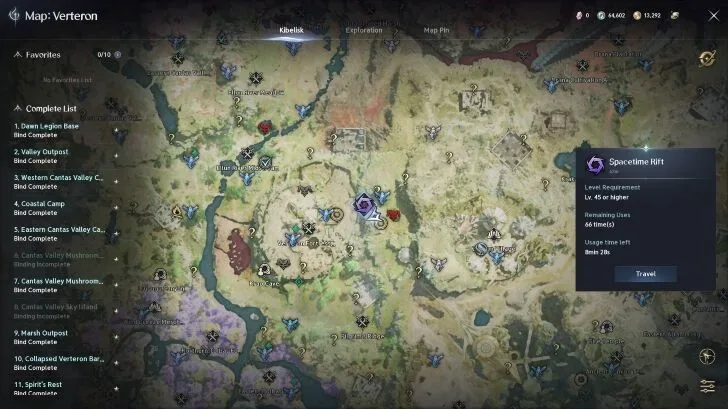
Check the regional event timer and your character's current entry conditions. Prepare supplies, clear inventory space and decide on a compact objective group. Keep travel time inside the usage allowance actually shown by the game. The ten-minute portal and one-hour visit figures found in older walkthroughs are not independently confirmed here for all Global regions.
Find and enter the current Rift
- Look for the system announcement and current vortex marker.
- Select that marker and inspect its level, entry allowance and remaining time.
- Use an available friendly teleport point, then travel the remaining distance manually if navigation would take too long.
- Read the interaction panel before confirming. Distinguish the entrance countdown from the usage time granted after crossing.
- If the entrance is exhausted or closed, check for a new live marker rather than assuming a cached position is still usable.
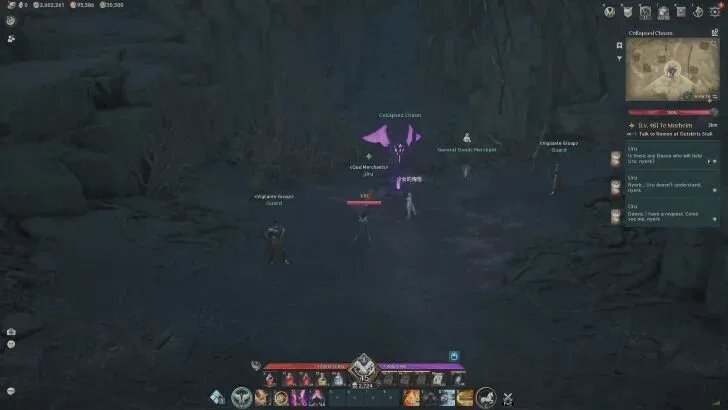
Do not infer a live portal's position from an external database pin alone. Candidate portal areas are a search aid; the in-game map establishes the current occurrence. The independent dataset lists Rift areas in Verteron, Altgard, Eltnen and Morheim, but a client record is not proof that every listed area is currently active for your character.
Finish a compact objective route
After entry, follow the tracked quest's region and objective. Complete nearby steps together and check the quest log after an interaction or kill. Crossing itself may only complete the first stage of a chain.
Keep PvE objectives separate from optional combat against players. Read the current PvP and guard rules before approaching an enemy settlement or travel point. A familiar-looking Kibelisk should not be assumed to provide your normal home-region travel service.
The usage timer continues while you move, recover and inspect the map. When the remaining time is short, finish a nearby tracked task rather than starting a distant route. If the game displays an exit or return condition, follow that condition; this guide does not promise a free re-entry after death or early departure.
Read rewards before investing a run
Use the reward preview for the exact quest and character. This review did not independently verify the earlier table of 0.1% EXP, 21,000 Bound Kina, Stigma Shards and 2,000 Abyss Points, so those figures have been removed. One introductory quest should not be treated as the reward total for an entire Rift route.
A reward appearing in client data does not establish a current live bonus, drop rate or weekly allowance. If a quest has already been completed, verify whether it is repeatable before budgeting another run around it.
Troubleshooting
| Symptom | Check next |
|---|---|
| Countdown ended, no portal | Correct server region, current announcement, map and maintenance notice |
| Marker exists, entry fails | Live level/prerequisite, remaining time and available uses |
| Quest points somewhere else | Whether the marker is an objective beyond the entrance |
| Crossing completed, quest unfinished | Remaining stages in the tracked quest chain |
| Returned before completing the route | Live usage timer and the exit/death condition shown by the game |
When asking for help, include region, faction, quest name and the full entry error. Those details distinguish a wrong route from an unavailable activity. Do not import a similarly named KR/TW Chapter event's requirements or rewards into this Global Rift check.
Sources and verification
- MetaBot Spacetime Rift schedule and quests — Independent provider: server-clock schedule; regional timezone anchors are assumptions to compare with the game.
- MetaBot database methodology — Independent data provider: reports parsing Global client build 0.0.4387.0. Client records do not prove live activation or server-side behavior.