Source review: 7 October 2026 · Global. Client-data references below are independent database records, not NC announcements or our own gameplay tests. Routes and spending priorities are editorial suggestions; live unlocks, prices and reward prompts take precedence.
An AION 2 Empyrean Trace is a feather-shaped exploration collectible used at a regional Monolith. Collect the feather, continue the main story until the Empyrean Monolith feature unlocks, and then resonate your matching Traces at that Monolith to advance its levels and receive character-progression rewards.
You can collect Traces before unlocking the Monolith, so do not discard them if their purpose is not yet clear. Their regional and faction labels matter: Elyos encounter Traces associated with areas such as Verteron, while Asmodians encounter the corresponding Altgard version. Take each type to its matching regional Monolith rather than treating every feather as one interchangeable currency.
Monolith rewards can also contribute Hidden Cube Keys. Combine nearby cube checks with the level 45 progression route.
AION 2 Empyrean Trace Quick Answer
| Player question | What to do |
|---|---|
| What are the feather icons | They mark collectible Empyrean Traces in the open world. |
| How do I collect one | Reach the feather and interact with it. Some require flight, gliding, climbing, or clearing nearby enemies. |
| Why can I not use my Traces | The Monolith is introduced through the main story. Keep progressing until the Empyrean Monolith sequence unlocks it. |
| Where do I turn them in | Use the Monolith associated with the Trace's region. |
| What do they provide | Monolith progression can award amulet-enhancement materials, skill-related progression, titles, permanent benefits, and other milestone rewards shown in the interface. |
| Should I keep collecting after an early milestone | Yes. Check the current Monolith reward track and the Substance Morph output before deciding whether a Trace is truly surplus. |
| Are these part of Essence Extraction | No. Empyrean Traces and Essence Extraction are separate progression activities. |
The safest short version is simple: collect feathers when they are reasonably close to your route, keep them, unlock the Monolith through the story, and resonate them in batches.
Recognize Empyrean Traces in the World
Empyrean Traces appear as bright feather-like objects. Their map symbol also resembles a feather, which is why players commonly call them feathers or Monolith feathers rather than using the full item name.
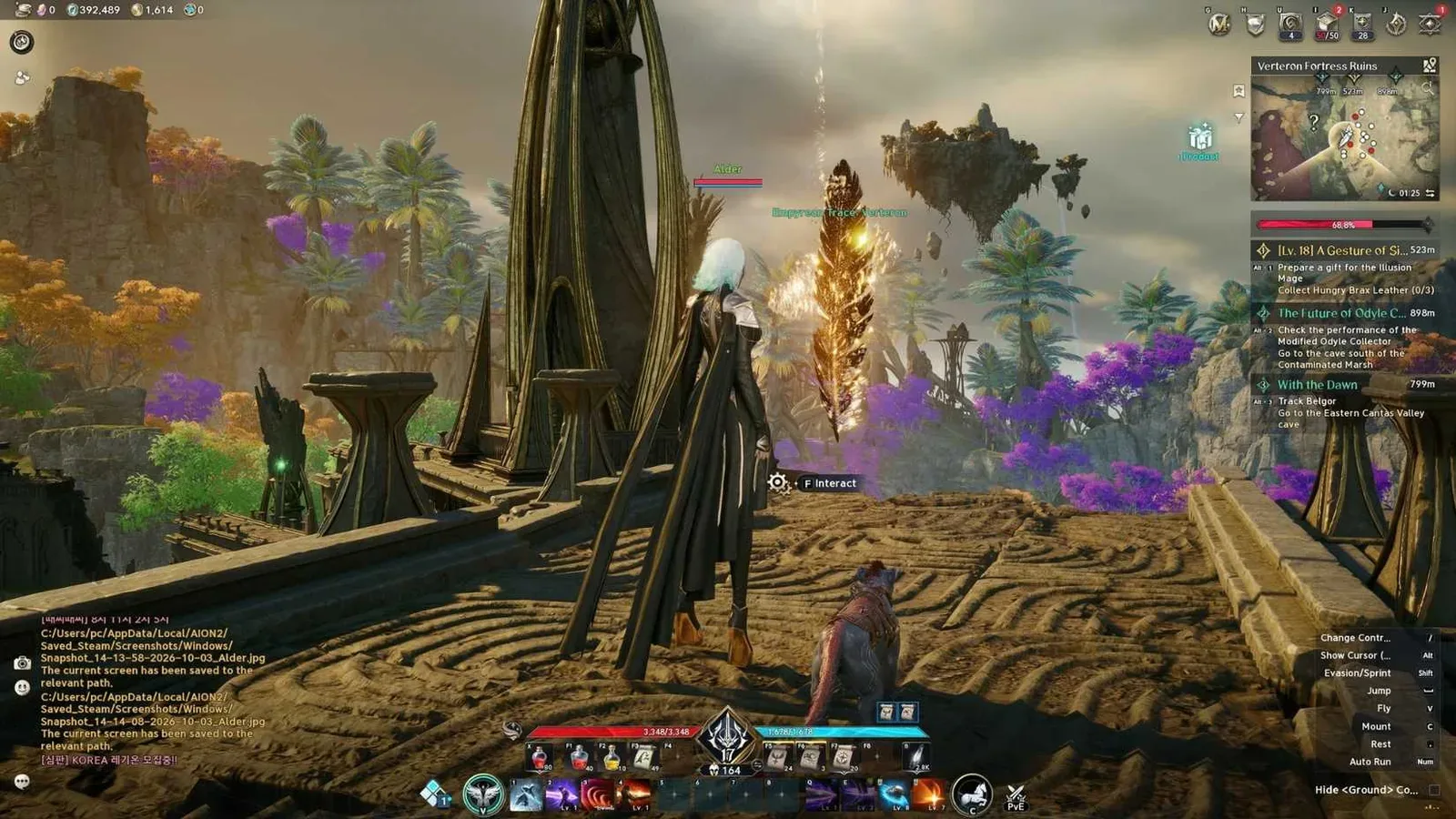
The feather and its minimap marker are visible together.
The marker tells you the horizontal position, but the collectible may not be standing at ground level. If you arrive directly on top of a marker and see nothing, inspect the space above and below your character before leaving. Traces can be placed on elevated ledges, inside caves, near hostile creatures, or along routes that require flight or gliding.
Use the following identification check:
- Confirm that the marker uses the Empyrean Trace feather symbol rather than a Hidden Cube, resource, or quest icon.
- Move close enough to look for an interactable feather-shaped object.
- Check nearby ledges and vertical terrain if the object is not at the marker's apparent elevation.
- Clear enemies only when they prevent you from interacting safely.
- Interact with the object and verify that the regional Trace enters your inventory.
Do not confuse Empyrean Traces with other open-world progression markers. Sealed Dungeons and Strongholds have their own rewards and systems; collecting a feather does not complete either activity or grant their progression currencies.
Unlock the Monolith Before Turning In Traces
The Monolith does not become usable the moment you find your first feather. Its introduction is tied to the main story through the Empyrean Monolith sequence. Reports disagree on the exact character level at which every player reaches that step, so story progress is the reliable condition—not a fixed level number.
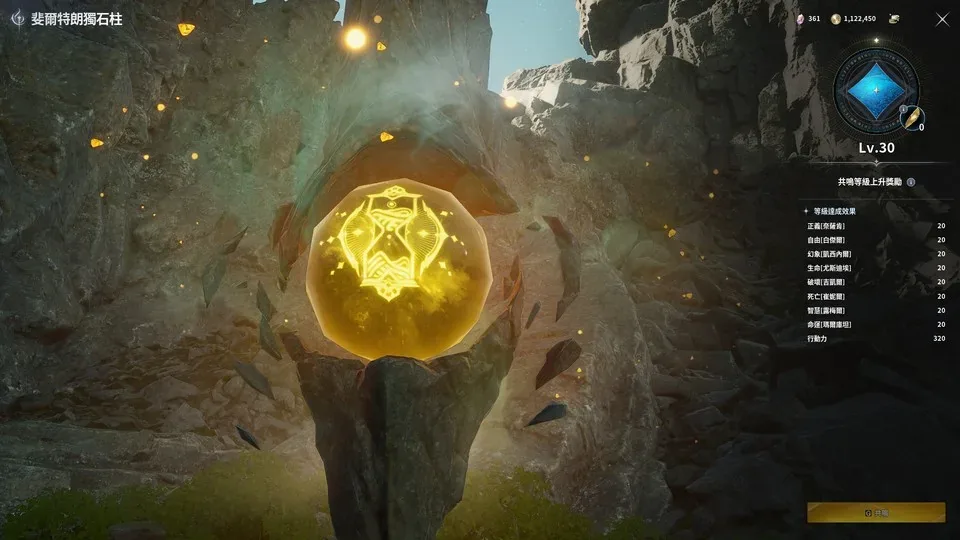
The Monolith structure and its progression interface are shown together.
If you already have Traces but cannot interact with the Monolith, follow this order:
- Keep the Traces. Finding them early does not mean you missed an exchange menu or chose the wrong reward.
- Return to the main story. Continue until the Empyrean Monolith objective introduces the feature.
- Complete the guided interaction. The story takes you through collecting or presenting a Trace and using the Monolith.
- Follow the amulet-enhancement tutorial. The same sequence introduces how relevant Monolith rewards connect to enhancement.
- Return with previously collected Traces. Once the feature is active, you can resonate the batch you gathered earlier.
This also explains why two characters at similar levels may appear to have different access: one may have advanced farther through the required story sequence.
Collect Empyrean Traces Efficiently
You do not need to stop for every distant feather the first time it appears. The efficient approach is to combine Trace collection with quests and exploration, then perform a deliberate cleanup run when you are ready to finish a region.
Collect nearby feathers during normal progression
When a marker is close to a quest path, waypoint, dungeon entrance, or other objective, collect it immediately. This prevents a later cleanup route from becoming a long series of isolated trips. Traces on obvious ground-level paths usually cost little time, while a marker far above you or behind difficult enemies may be better saved for a dedicated sweep.
Search vertically before assuming a marker is wrong
A map marker does not fully describe height. When the feather is missing at ground level:
- Rotate the camera upward and inspect cliffs, structures, branches, and floating terrain.
- Look for an updraft, launch point, or higher ledge that creates a flight or glide route.
- Check for a cave entrance or lower passage near the marker.
- Reposition and compare the marker again instead of circling the same flat point.
- Leave and return later if your current movement options or nearby enemies make the attempt inefficient.
Flight is part of AION 2 exploration, and some Traces are deliberately placed where vertical movement matters. A marker that appears inaccurate may simply represent a feather above or below your current elevation.
Keep regional Trace types organized
Trace items are tied to their regions. Read the full inventory name before traveling to a Monolith, especially if you collected feathers across more than one map. A Verteron Trace should be taken to the Verteron Monolith; the corresponding faction and regional versions belong to their own Monoliths.
This regional distinction prevents a common failure: reaching a Monolith with feathers in the inventory but seeing no applicable progress because the carried items belong elsewhere.
Finish with a focused map sweep
Once normal quests stop carrying you through a region, open the map and filter for Empyrean Traces. Divide the remaining markers into small geographic clusters rather than chasing the nearest icon one at a time across the entire map.
A practical sweep looks like this:
- Choose one section of the region.
- Start from a convenient travel point.
- Follow a loop through nearby feather markers.
- Handle ground-level collectibles before awkward vertical detours.
- Record or hide completed markers if the interface does not make completion obvious.
- Return to the regional Monolith after completing a useful batch.
This approach reduces repeated travel and makes it easier to identify the few markers that still require a cave entrance, flight route, or enemy clear.
Resonate Traces and Claim Monolith Progress
After the Monolith is unlocked, bring it the matching regional Traces and use its Resonate interaction. The interface displays your current Monolith level, how many additional Traces are required for the next level, and the rewards attached to upcoming milestones.
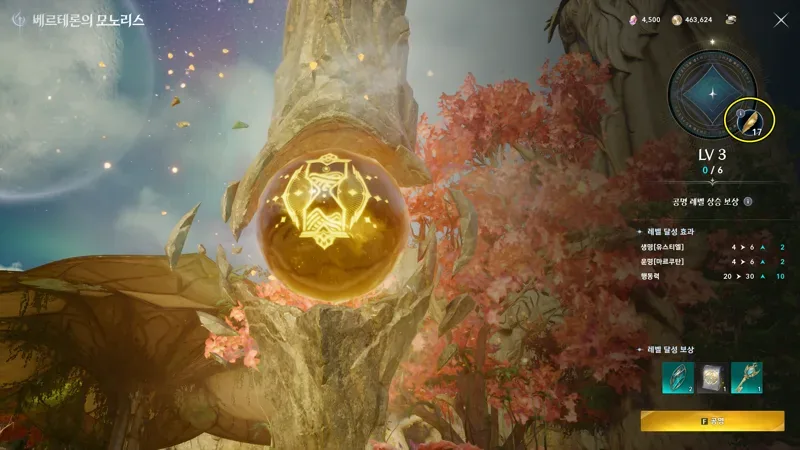
The resonance screen shows current progress, milestone effects, and rewards.
Use this sequence each time you return:
- Confirm that the Monolith belongs to the same region named on your Trace items.
- Open the Monolith interaction and select the resonance option.
- Continue resonating until you exhaust the applicable batch or reach your intended milestone.
- Open the reward preview and inspect what the next levels provide.
- Check your inventory for awarded consumables, enhancement materials, or skill-related items.
- Use any progression item that requires manual activation instead of assuming its benefit applied automatically.
- Open the Enhancement menu when you receive a compatible amulet-enhancement material, select the correct amulet, and review the cost before confirming.
Resonating the Trace is the step that converts exploration progress into Monolith progress. Simply carrying feathers does not provide the final benefit, and receiving a consumable reward does not always mean that reward has already been used.
Understand the Monolith Rewards
The Monolith is a milestone track rather than a one-for-one vendor where every feather purchases the same item. Rewards can change as the Monolith advances, so the in-game reward preview is the correct place to see the next result for your current Global build.
Supported reward categories include:
| Reward category | What to check |
|---|---|
| Amulet enhancement | Look for the appropriate enhancement material, then use the Enhancement interface on the relevant amulet. |
| Skill progression | Inspect awarded stone or skill-point items and use them from the inventory when required. |
| Permanent progression | Review the level reward and character changes after reaching a milestone. |
| Titles and utility rewards | Check newly unlocked titles and any consumable or reset items delivered by the milestone. |
| Later-level rewards | Use the Monolith's reward preview instead of assuming every level repeats an earlier reward. |
Reward terminology differs across regions and older guides. For example, similarly described skill-point stones may appear under different translated names. Follow the item name and description shown by the current Global client, and do not copy a Korean or Taiwan reward table as if every name and conversion already applies to Global.
Use Amulet Rewards Correctly
Monolith progression is connected to amulet enhancement, but collecting a feather does not directly increase an amulet's value. The full chain is:
- Collect the regional Empyrean Trace.
- Resonate it at the matching Monolith.
- Reach a Monolith milestone that awards an applicable enhancement material.
- Open the main Enhancement interface.
- Select the amulet and verify the required materials.
- Confirm the enhancement only after checking that the correct item is selected.
If enhancement is unavailable, determine which link in that chain is missing. You may still need to unlock the Monolith, resonate more Traces, claim or use a reward item, or obtain another material required by the enhancement screen.
Manage Extra Empyrean Traces Safely
Do not destroy extra feathers merely because an early Monolith milestone is complete. Later Monolith levels require continued collection, and the open world contains far more Traces than a new player will use during the introductory quest.
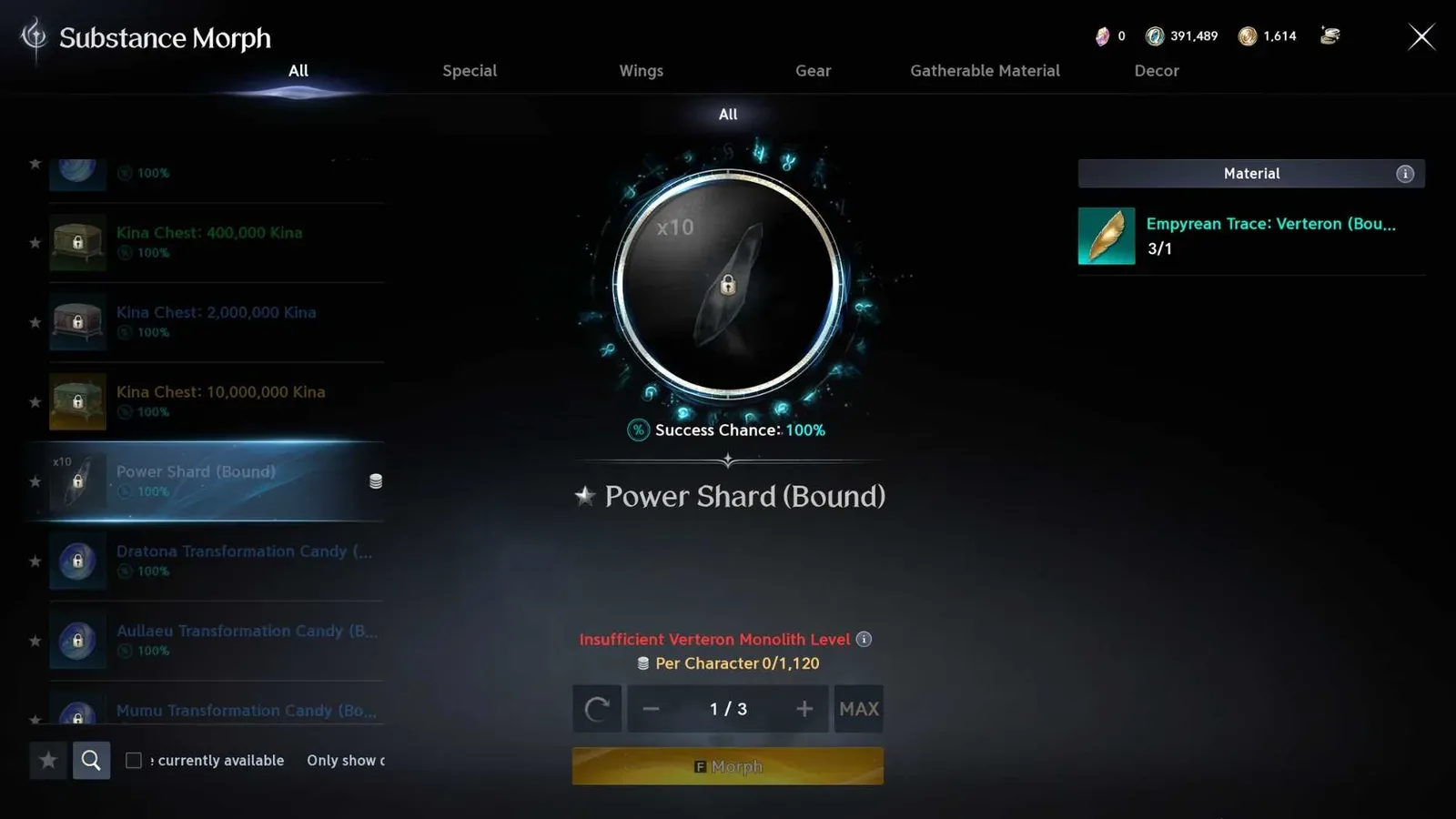
The conversion result and selected quantity are visible in Substance Morph.
After reviewing the Monolith track, inspect the Trace in your inventory for a Substance Morph option. Current Global guidance reports that surplus feathers can be morphed into Power Shards. Other regions have offered different conversions, including enhancement-related materials, but those regional options should not be assumed to exist on Global.
Before morphing a large batch:
- Confirm that the matching Monolith no longer needs those Traces for a reward you want.
- Read the conversion output displayed by the current client.
- Verify the quantity selected before confirming.
- Do not rely on a Korean or Taiwan conversion result when the Global interface shows something different.
- Store the feathers if the available output is not useful to you or if the desired regional conversion has not reached Global.
The interface preview is more reliable than an old conversion recommendation because morphing availability and outputs can vary by region and patch.
Clean Up the Map After a Collection Run
Feather markers can crowd the world map, particularly after you begin a regional cleanup. If collected icons remain visible or you temporarily want to focus on another activity, open the map's filter controls and look under the Content category.
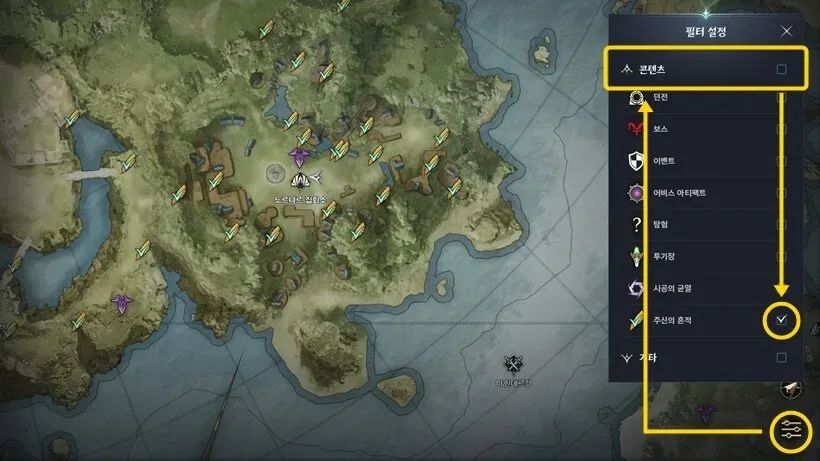
The expanded Content filter shows the trace layer toggle.
You can hide the entire Content category, but that may remove other useful markers. Expanding the category and disabling only Empyrean Trace is the more precise option when the interface provides it. Re-enable the filter before the next collection sweep.
If you use a map view with a Hide Found control, use that instead when you want to preserve uncollected Trace markers. Map interfaces and completion displays can differ, so confirm that remaining feathers are still visible before leaving a region.
Fix Common Empyrean Trace Problems
| Problem | Likely cause | Action |
|---|---|---|
| I found feathers but cannot use them | The Monolith story feature is not unlocked | Continue the main story until the Empyrean Monolith sequence introduces resonance. |
| The Monolith does not accept my feathers | The Trace belongs to another region | Read the item's regional name and travel to its matching Monolith. |
| I am standing on the marker but see nothing | The Trace may be above, below, inside a cave, or behind terrain | Search vertically and inspect nearby entrances, ledges, and flight routes. |
| Resonating did not seem to increase my power | A reward may require manual use or enhancement | Inspect newly received inventory items and the Enhancement menu. |
| My map is covered in feather icons | The Content filter is still showing Empyrean Traces | Disable only the Empyrean Trace layer or use Hide Found when available. |
| A guide promises a different morph reward | It may describe another region or patch | Trust the conversion output displayed in the current Global client. |
| I expected Essence Extraction progress | Empyrean Traces are a separate system | Use the relevant Essence Extraction activity instead; feathers feed Monolith progression. |
Empyrean Trace Completion Checklist
Use this checklist before considering a region finished:
- The Empyrean Monolith story sequence is complete.
- The regional Monolith can be interacted with normally.
- Nearby quest-route feathers have been collected.
- Remaining map markers have been swept in geographic clusters.
- High, low, and cave-level positions were checked for missing collectibles.
- Every carried regional Trace has been taken to the matching Monolith.
- Monolith rewards that require manual use have been activated.
- Applicable amulet-enhancement materials have been reviewed in the Enhancement menu.
- Extra feathers have been stored or morphed only after checking the current output.
- The map filter has been adjusted so collected markers do not obscure your next objective.
The essential loop remains find, interact, resonate, inspect rewards, and repeat by region. Following that sequence turns the feather markers from unexplained inventory clutter into permanent character progression without mixing them up with Sealed Dungeons, Strongholds, Hidden Cubes, or Essence Extraction.
Sources and verification
- MetaBot Monolith records — Independent client-data source: regional Trace types, Monolith requirements and reward tables.
- MetaBot database methodology — Independent data provider: reports parsing Global client build 0.0.4387.0. Client records do not prove live activation or server-side behavior.