Source review: 7 October 2026 · Global. Official references are linked under Sources. Service and event information is a dated snapshot; check the notice for subsequent changes.
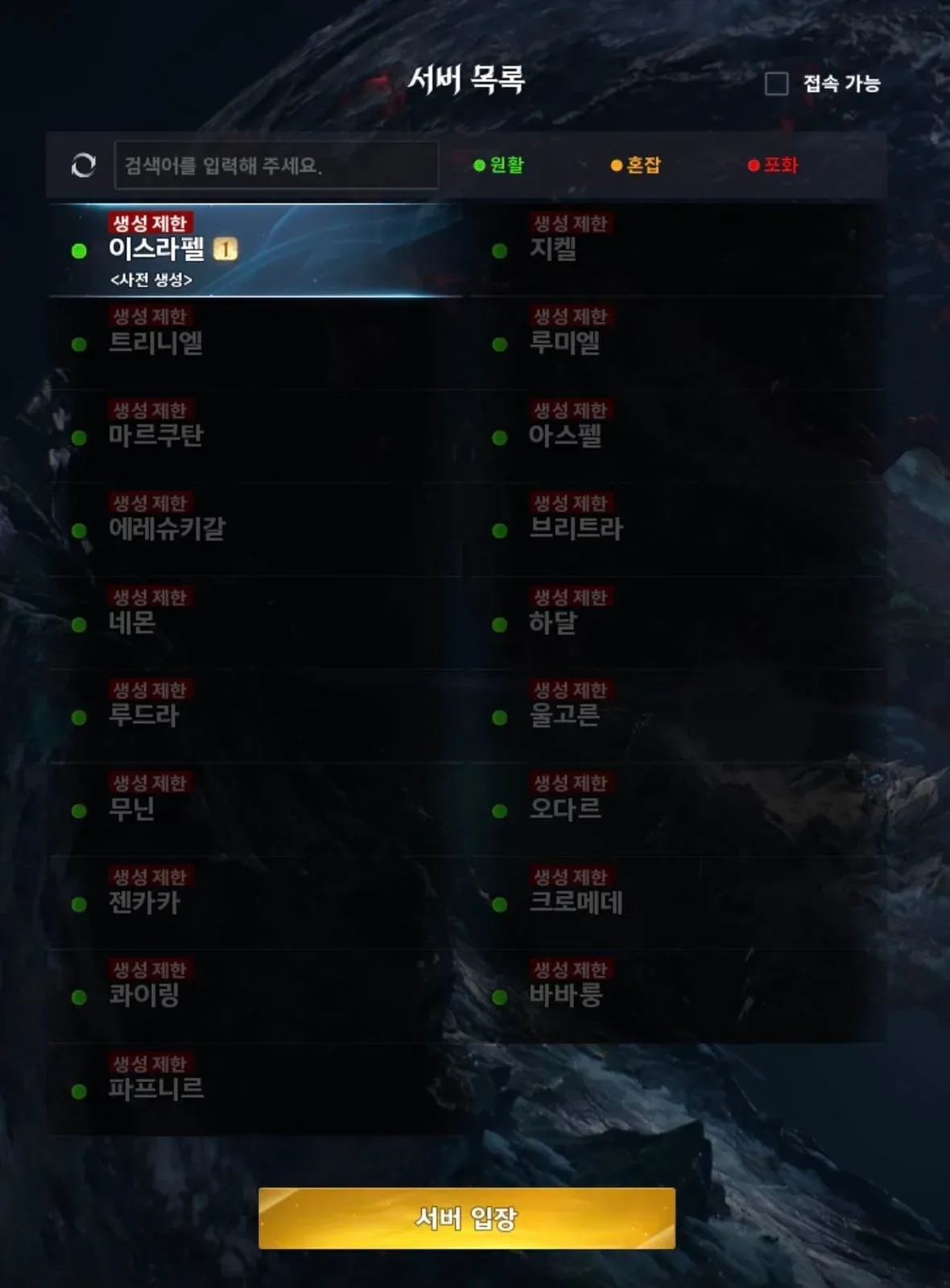
If AION 2 displays Creation Restricted on the server you want, first check whether the restriction follows that particular server or prevents creation everywhere. A closed server needs an available creation slot or an announced change to its admission rules; changing a character's appearance, restarting repeatedly, or adjusting your PC clock is not a confirmed way to reopen it. Your practical choices are to wait for that server, choose another available server, or coordinate a fresh start with your friends.
The message alone does not establish an account ban, a network fault, or a reopening time. Global launched on October 5, 2026, and uses shared servers across Steam and PURPLE. Older Advanced Access messages and advice that moves you to the Taiwan version should not be treated as current Global fixes. Keep the account, region, server, and exact error visible while you work through the checks below.
Check Global service notices first. Plan the character creation steps and class choice while waiting for a suitable server.
Identify where character creation stops
Before changing anything, locate the step that fails. A server admission restriction, a login queue, and a client that never reaches server selection require different responses. Calling all three problems a creation bug can lead you to change settings that have no connection to the actual failure.
| What you see | What the message establishes | Next useful check |
|---|---|---|
| Creation Restricted appears beside your preferred server | That server is not currently offering the creation action to you | Check whether another server offers creation and whether your friends need the same server |
| The server list opens, but no acceptable destination is available | Your current server choices do not meet your requirements | Check current Global notices and decide whether to wait or change the group plan |
| The client stays at the initial screen | You have not yet reached the character-creation decision | Restart the client and launcher once, then record the exact stage if it still fails |
| You enter a login queue after choosing a server | Access is waiting at the login stage | Treat the queue separately from a disabled creation option |
| An Advanced Access entitlement message appears | The client is reporting an access condition | Check that you are using the current Global client and intended account |
| Creation fails everywhere with the same account-specific error | The issue extends beyond one preferred server | Preserve the error and ask support to investigate the account or service condition |
Do not infer the reason solely from a population label. Players have reported a server showing an ordinary-looking capacity state while creation remained restricted. That observation does not establish the admission rule, but it does show why the creation control itself matters more than guessing from the population display.
Check the intended account and Global version
Steam and PURPLE provide the same Global content and shared servers. Switching launchers is therefore not a confirmed method of obtaining a creation slot on a closed Global server. It can also introduce confusion if the launcher signs you into a different NC account from the one you intended to use.
Check these details before retrying:
- Confirm that you launched the Global version rather than a Korea or Taiwan client.
- Confirm the account currently signed into the launcher.
- Read the server name carefully and compare it with the destination your friends selected.
- Record the exact restriction or entitlement message instead of summarizing it as “cannot play.”
- Separate a disabled creation option from a login queue or a failure before the server list.
If the account identity is unclear, the official account area's My Page > Manage Login is the place to inspect login associations. Use that check to establish which account you are using, not as a promise that changing an association will remove a server restriction.
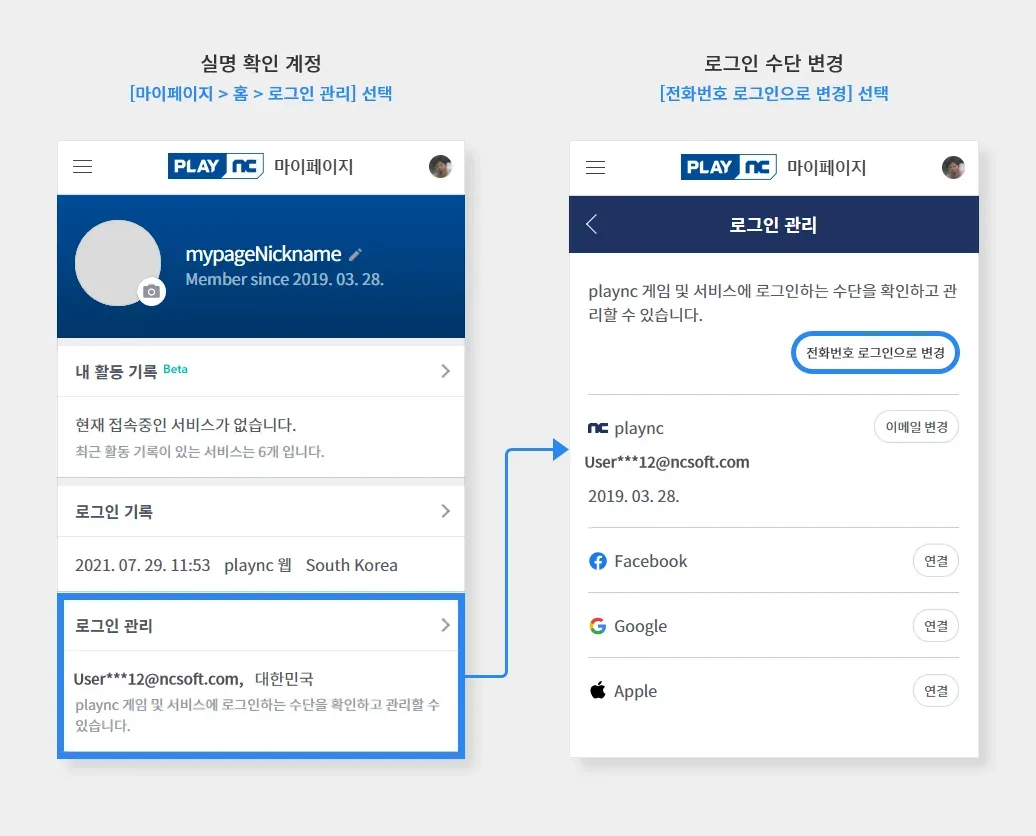
Use My Page > Login Management to verify the NC account associated with the launcher.
An old Advanced Access post describes an earlier access period. Global's October 5 launch changed that context, so paying for an old access entitlement is not a supported answer to a current creation restriction. An entitlement error that persists in the current client deserves its own account investigation.
Test whether the restriction belongs to one server
Return to server selection and compare the creation state on other destinations in the same intended Global environment. This comparison helps you distinguish a preferred-server problem from a failure that follows the account everywhere. You do not need to commit to a new character just to record what the list offers.
Use the result as follows:
- Another server offers creation: the immediate obstacle is choosing an acceptable destination. Decide whether waiting for the preferred server or starting elsewhere better serves your group.
- Every checked server is restricted: retain the names and displayed states, then check current service notices before changing local settings.
- The server list cannot be reached: investigate the login or client stage first. You have not yet demonstrated a server-specific creation restriction.
- The wording changes between servers: record each message separately. A queue, a creation lock, and an entitlement error should not be merged into one diagnosis.
Availability is a changing state, so an older screenshot is not proof that a server is open now. Likewise, someone creating successfully on a destination earlier in the day does not guarantee that your current attempt will be admitted. The useful evidence is what your current client offers at the moment you check.
Choose between waiting and starting elsewhere
Waiting is the direct option when the exact server matters more than beginning immediately. Starting elsewhere is practical when you can accept a different destination, but it should be an explicit choice rather than a temporary assumption that progress can certainly be moved later.
| Your priority | Practical choice | Condition to accept first |
|---|---|---|
| Join friends who already have established characters | Wait for the desired creation option and monitor current notices | There is no confirmed reopening time for your particular server in this guide |
| Begin playing immediately | Choose a destination that currently permits creation | You may be separating your initial progress from your friends' server |
| Start together as a new group | Compare available destinations before anyone commits | Everyone needs to verify the same agreed destination |
| Preserve an existing main character | Keep it while investigating the restriction | Deleting it is not a confirmed way to unlock admission for another person |
| Rely on a later transfer | Check the current transfer announcement and eligibility first | A community date alone does not establish availability, destinations, or requirements |
Do not promise friends that the lock will lift after maintenance, at a particular hour, or when fewer players are online. A schedule for service work is not a schedule for reopening character creation unless the announcement explicitly says so. Plan around an available destination or a confirmed notice, rather than an estimated unlock.
Coordinate a group before creating replacements
If several friends have not started, agree on the server before spending time in the character editor. Ask each person to check the current creation state independently. One person's successful creation does not prove that everyone else's account will see the same availability later.
For a group split between established and new players, decide which cost you can accept: waiting, playing temporarily apart, or rebuilding together on an available destination. Preserve existing characters while making that decision. A new start can resolve the immediate destination mismatch, but it also creates another progression commitment and should not be presented as a free transfer.
Avoid making a replacement character first and discussing the server afterward. That reverses the useful order and can leave the group with more characters on incompatible destinations. The immediate end state is simple: everyone knows the intended account and server, and each new player has verified that the creation action is available there.
Perform a limited client and clock check
A single clean restart is reasonable if the client is stuck before server selection or an account message appears inconsistent. Close the game, restart the launcher, and retry with the intended account. One player's successful restart does not turn restarting into a guaranteed fix for every server lock.
If the PC's date or time is wrong, correct it before retesting the client. On Windows, open the taskbar clock's Adjust date and time settings and inspect the automatic time and time-zone options. The purpose is to remove an obvious configuration problem, not to change your clock until a restricted server appears open.
Use this order:
- Note the original error and where it appeared.
- Close the game before adjusting the clock.
- Open Windows Date & Time settings.
- Check whether the date, time, and time zone reflect your actual location and current time.
- Enable the applicable automatic settings if they were incorrectly disabled.
- Launch the same Global client with the same intended account.
- Compare the new result with the original message.
If the preferred server still displays Creation Restricted while another server offers creation, further clock changes have not been shown to address that admission state. Stop treating the clock as an unlock mechanism and return to the destination decision.
Avoid workarounds that change the game region
Creating a Taiwan-region account through a VPN changes the environment you are entering. It does not establish access to your friends' Global server, and Korea or Taiwan progress does not carry over into Global. That makes a regional switch a poor answer when the actual objective is joining an existing Global group.
The restriction text also does not prove that your IP or account has been banned. Do not turn an uncertain diagnosis into a new-account purchase, a regional migration, or a promise that a network change will bypass admission. If the error explicitly concerns the account, preserve it for support rather than assuming the same cause as a disabled server option.
DNS changes should similarly be tied to an actual connection problem, not prescribed automatically for a creation label. The fact that a network setting can be changed does not demonstrate that it controls server admission. Keep troubleshooting proportionate to the stage that fails.
Preserve existing characters while checking deletion rules
Deleting an existing character is not a confirmed fix for a friend's Creation Restricted message. It can remove progress without changing the other account's admission state. Keep the character until you have a specific reason to delete it and have checked the confirmation shown by the current client.
Read the current deletion confirmation for the character's eligibility and waiting period. This review did not independently verify a current Global deletion minimum or universal waiting time. A deletion timer also does not establish when a creation-restricted server will reopen; do not delete a character as a speculative workaround.
If the interface does not match the announced rule, capture the displayed requirement and ask support to investigate that discrepancy. Do not repeatedly delete and recreate characters to test whether a server restriction has vanished.
Escalate with evidence that identifies the failed step
When the same account cannot create on any checked destination, or an account error persists after the limited checks, prepare a concise support report. A useful report identifies the actual step instead of merely stating that AION 2 is broken.
Include:
- Whether you launched Global through Steam or PURPLE.
- The server names you checked and their displayed creation states.
- The exact error text and a screenshot of the relevant screen.
- Whether another destination offered creation.
- Whether an existing character can still reach the game.
- The date, time, and time zone of the attempt.
- Whether the failure occurred before server selection, during creation, or at login.
Keep the report free of guesses about bans, population balancing, or transfer eligibility unless the interface explicitly supplies that information. Those guesses can obscure the distinction support needs to investigate.
A resolved attempt ends with the intended character created on an acceptable Global destination. If the exact server remains restricted, the honest result is a waiting decision with the account and server checks completed—not a claimed fix based on a successful login somewhere else.
Sources and verification
- AION 2 Global launch FAQ — Official: platforms, shared servers and account boundaries.
- AION 2 Global notice board — Official: current maintenance, service and event updates.
- NCSOFT Global launch announcement — Official: Global formal launch on 5 October 2026.