Source review: 7 October 2026 · Global. Official references are linked under Sources. Service and event information is a dated snapshot; check the notice for subsequent changes.
AION 2 Global launched on October 5, 2026, but a launch confirmation does not prove that every region and server is available now. The reliable way to check AION 2 server status is to start with current NC notices, confirm that the notice applies to Global, and then compare its affected services and maintenance window with the error shown by your launcher or client.
The official October 7 maintenance notice lists a scheduled start of October 6 at 23:30 PDT / October 7 at 08:30 CEST, equivalent to October 7 at 14:30 Beijing time. It estimates 3 hours 30 minutes for regular servers and 5 hours 30 minutes for ASIA servers. These are planned durations, not confirmed reopening times. The public notice can be revised; this page does not establish the servers' current state.
If login works but creation fails, follow creation restriction checks. If a reward is missing, use the Twitch account-linking guide or coupon redemption guide for that specific claim.
Latest verified AION 2 service baseline
AION 2 Global is in live operation on Windows PC through Steam and PURPLE. Both clients provide the same Global game content and connect to shared servers. Korea and Taiwan operate separately, so notices, server lists, mobile availability, and maintenance information for those versions may not apply to Global.
The current page is a troubleshooting reference rather than a live monitoring widget. It cannot confirm that a particular server is online at the moment you read it. Use the following baseline to interpret current evidence:
| Status item | Verified baseline | Practical meaning |
|---|---|---|
| Global service | Formally launched October 5, 2026 | The game is no longer waiting for its public launch, but maintenance and incidents can still interrupt access |
| Supported Global clients | Steam and PURPLE on Windows PC | A mobile result may describe Korea or Taiwan rather than Global |
| Steam and PURPLE servers | Shared | Changing launchers does not provide a separate set of game servers |
| October 7 maintenance | Scheduled for 14:30 Beijing time | Check for a newer start, extension, completion, or cancellation notice |
| Regular-server duration | Approximately 3 hours 30 minutes | An estimate is not a recovery confirmation |
| ASIA-server duration | Approximately 5 hours 30 minutes | ASIA may remain unavailable after other regions return |
If the scheduled start time has passed, look for an official update before assuming the work started exactly on time. If the estimated duration has passed, look for an explicit completion message and then test the affected region. Maintenance schedules and details can change.
Fastest way to check AION 2 server status
Use this order so that a launcher symptom or an unverified player report does not send you through unnecessary repairs.
- Open the AION 2 Global notice board. Check the newest maintenance, known-issue, and service announcements. A current official notice takes priority over an older launch article or a third-party population page.
- Confirm the notice date and region. Global, Korea, and Taiwan are separate service contexts. Make sure the page says Global or otherwise clearly covers your version.
- Read the affected-services field. A notice may affect all game servers, one region, login, or another limited service. Match that scope against what is failing for you.
- Check the wording of the time window. “Scheduled,” “expected,” and “approximately” describe a plan. They do not mean the servers have already gone down or come back.
- Compare the official notice with the launcher. Steam and PURPLE use the same Global servers, but each launcher can still have its own display, update, or account-session problem.
- Use community reports only as supporting evidence. A cluster of reports can reveal a developing incident, but a few reports do not prove a game-wide outage. Look for agreement across the official notice, your region, and multiple affected players.
Steam announcements and the official AION 2 Discord can provide additional updates, but always check that the message is current and concerns the Global service. A screenshot copied without its date, region, or follow-up message is incomplete evidence.
How to read a maintenance notice
A useful maintenance notice contains several separate facts. Reading only the headline can lead to the wrong conclusion.
| Notice field | What it establishes | What it does not establish |
|---|---|---|
| Start time | When downtime is planned to begin | That shutdown occurred at the exact minute |
| Estimated duration | The intended length of the work | A guaranteed reopening time |
| Affected services | The systems expected to be unavailable | That every unrelated feature is broken |
| Region or version | Which service environment the notice covers | That other regions follow the same schedule |
| Completion update | That the announced work has ended | That every individual login or connection issue is fixed |
| Extension update | That the original estimate changed | A final recovery time unless one is explicitly confirmed |
During official maintenance, the game login may be temporarily unavailable and active players may be disconnected. Repeatedly restarting or reinstalling the client will not restore a server that NC has intentionally taken offline. Wait for a completion update, then restart the launcher and allow any required update to finish.
A historical launch notice is not a current outage notice. Use the newest affected-region announcement and its follow-up before diagnosing a connection failure.
How to tell whether AION 2 is down
Different failures can look similar at first. Classify the symptom before changing settings or moving to another server.
| What you see | Most likely category | Best next check |
|---|---|---|
| An official maintenance message and unavailable login | Planned downtime | Confirm the region, affected services, and latest schedule update |
| Many servers or regions fail at the same time without a notice | Possible wider incident | Recheck official announcements and compare reports from the same region |
| Only one named server fails | Server-specific problem or capacity state | Confirm that server’s current state and test another existing character only if available |
| A queue appears | Service is reachable but capacity is constrained | Remain in the queue or retry later instead of treating it as a total outage |
| A server is marked full | Capacity is high | Check whether existing-character login and new-character creation have different restrictions |
| Character creation is unavailable | Creation restriction | Do not assume existing characters are unable to log in |
| Steam does not show the game as playable | Launcher or entitlement display problem may be involved | Check for a service notice, then restart Steam after service is confirmed available |
| The client disconnects while other players remain online | Local route, session, or isolated service issue may be involved | Relaunch once and record the exact error if it repeats |
A single successful connection also does not prove that every region is healthy. The October 7 schedule assigned a longer expected window to ASIA than to regular servers, so players in different regions could receive different results during the same maintenance event.
Creation restrictions are not a full outage
Temporary character-creation restrictions can appear when a server is busy or when population needs to be controlled. This state is narrower than an offline server. Existing characters may still be able to enter even when new characters cannot be created.
Treat these as separate questions:
- Can the launcher authenticate your account?
- Can the client reach server selection?
- Is the selected server online, busy, or full?
- Can an existing character enter that server?
- Is only new-character creation restricted?
Do not delete a character, abandon a preferred region, or create an unrelated replacement until you have confirmed which layer is blocked. If you are joining friends, recheck the target server later instead of assuming a temporary creation restriction is permanent.
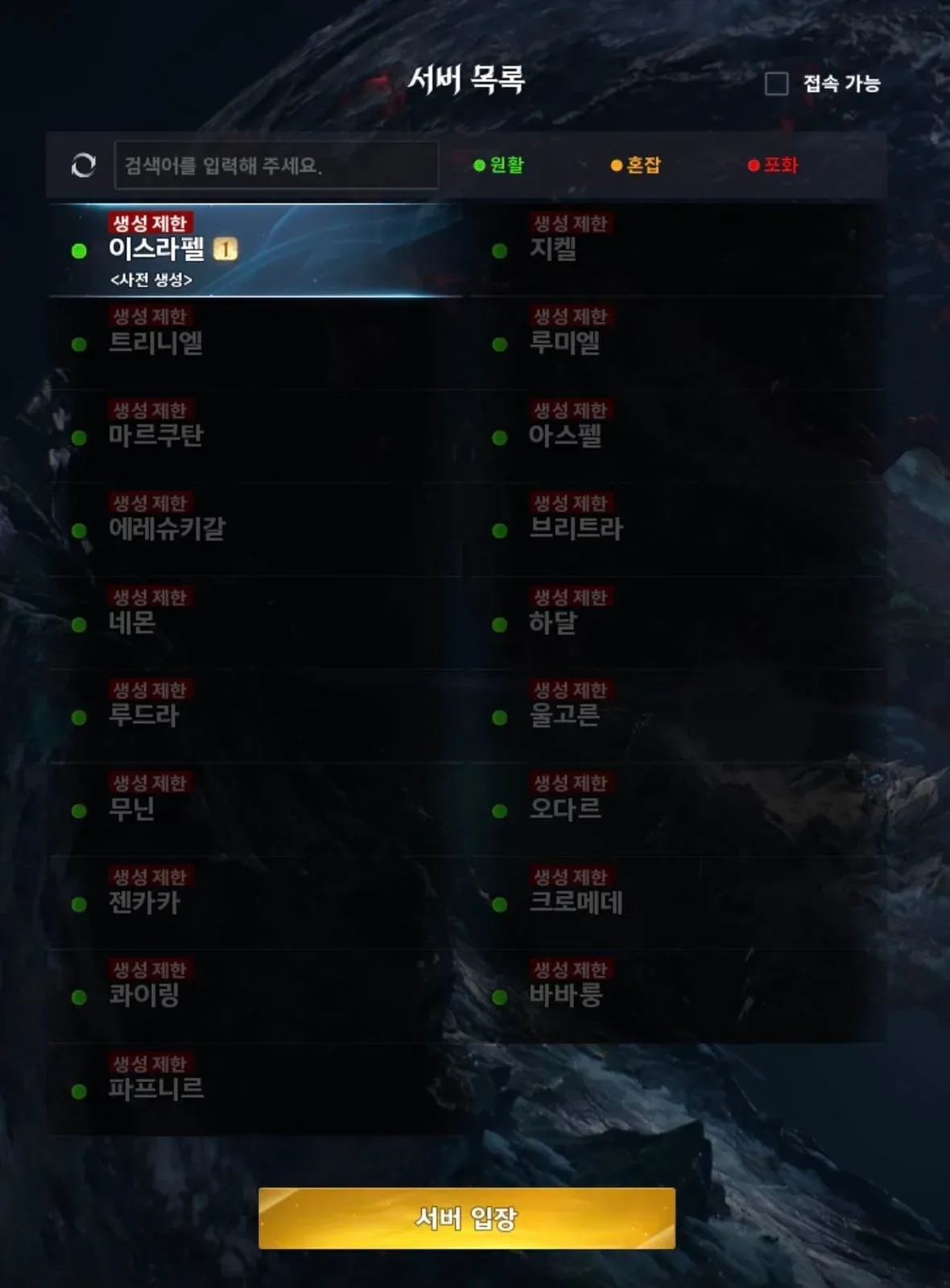
The server list separates connection status from character-creation restrictions. Example only; the shown statuses are not live.
Population dashboards captured around launch displayed rapidly changing server loads, queues, and creation locks. Those values are snapshots, not stable facts. Use the current server-selection screen and current official notices for a decision today.
Login troubleshooting after service should be available
Follow these steps only after there is no active maintenance notice for your region or after NC has confirmed completion.
- Close the game and relaunch it once. This clears a stale game session without changing installations or account data.
- Restart the launcher. If you use Steam, exit Steam fully and reopen it. During the October 5 launch, some players who could not see AION 2 as playable recovered access after restarting Steam or their PC, but that historical fix is not proof that every later error has the same cause.
- Allow the client to update. A server may be back while an outdated client still cannot connect. Do not interrupt a required patch and then interpret the resulting version error as another outage.
- Check the selected region and server. A server name can exist in more than one regional list. Confirm that you are checking the same region where your character was created.
- Read the exact restriction. “Maintenance,” “full,” “queue,” and “character creation unavailable” require different responses. Record the wording rather than reducing every message to “server down.”
- Retry without making irreversible account changes. Do not delete characters or unlink accounts merely to test a connection problem.
- Prepare a precise report if the problem continues. Include the time, time zone, Global region, server name, Steam or PURPLE, exact error text, and whether the failure occurs before or after server selection.
If the game opens normally but a Twitch reward is missing, that is not server-status evidence by itself. Rewards are delivered to the linked NC account, and an older account association can place them somewhere other than the Steam account you currently expect. Treat that as an account-linking or reward-delivery problem rather than expanding it into an outage report.
Steam and PURPLE do not use separate Global worlds
Steam and PURPLE provide the same AION 2 Global content and share servers. This has two important consequences.
First, a confirmed game-server maintenance window affects access regardless of which of the two clients you prefer. Installing the other launcher is not a reliable maintenance bypass. Second, a problem displayed by only one launcher can still be a launcher, patch, or account-session issue rather than proof that the shared game world is down.
Compare the failure point. If both clients reach the same maintenance message, the shared service is the stronger explanation. If the official service is available and Steam alone says the game is not playable, restart Steam before performing larger repairs. If authentication succeeds but one server is full or creation-restricted, changing launchers will not remove that server-side restriction.
Keep Global, Korea, and Taiwan reports separate
AION 2 Global currently runs on Windows PC through Steam and PURPLE. Korea and Taiwan have their own service history and mobile availability. A mobile outage report from Android or iOS therefore does not demonstrate a Global PC outage.
Apply the same separation to server lists and maintenance schedules. A Korean or Taiwanese notice may contain familiar server names while still describing a different environment. Before acting on any status page, verify all four identifiers:
- Service version: Global, Korea, or Taiwan
- Region: such as NA East, NA West, Europe, South America, or Asia
- Platform: Steam, PURPLE, or a region-specific mobile client
- Server: the exact world containing your character
This prevents a real incident in one service from being incorrectly reported as a worldwide AION 2 failure.
Signals that should not be trusted alone
Third-party status tools can be useful, but they may combine automated checks, user submissions, cached values, or estimated population data. The local snapshots available for this page disagreed in ways that make exact live counts unsuitable for a static guide. One tracker was still “checking” every listed server, while another displayed specific population totals. A different outage page mixed Windows reports with Android and iOS reports even though Global is a Windows PC service.
Do not treat any of the following as conclusive by itself:
- An “updated seconds ago” label without an official service confirmation
- A scheduled end time with no completion notice
- A small number of anonymous user reports
- A population estimate presented as an exact live player count
- A launch-day article reused for a later incident
- A report that omits region, platform, server, or time zone
- A Korea or Taiwan notice applied automatically to Global
The strongest result comes from matching a current official notice to your service version and region, then confirming that your client shows a compatible symptom.
What to record before contacting support
A complete incident report is more useful than “the servers are down.” Capture the following details before the error disappears or changes:
- The exact local date, time, and time zone
- A screenshot of the full error message
- Global region and server name
- Whether the character is Elyos or Asmodian if the server entry depends on faction
- Steam or PURPLE
- Whether login fails before server selection, at server selection, during character selection, or after entering the world
- Whether the server is marked offline, busy, full, queued, or creation-restricted
- Whether an official maintenance or incident notice is active
- Whether relaunching the game and restarting the launcher changed the result
This information separates a broad outage from a region-specific incident, a server-capacity restriction, a stale launcher session, or an account problem. It also avoids claiming that all AION 2 servers are unavailable when the evidence covers only one world or one stage of login.
Returning after maintenance
After NC confirms that maintenance has ended, restart Steam or PURPLE, let the client finish updating, and try the character’s existing region and server. A rush of returning players can create queues or temporary capacity restrictions even after the service itself is online.
If login still fails, check for a follow-up known-issue or extension notice before reinstalling anything. Record the exact message and failure stage, then report the problem with the checklist above. The key distinction is simple: a planned end time tells you when recovery was expected, while an official completion update plus a successful regional login provides actual recovery evidence.
Sources and verification
- Official October 7 maintenance notice — Official: scheduled window and estimates; this is not live server monitoring.
- AION 2 Global notice board — Official: current maintenance, service and event updates.
- AION 2 Global launch FAQ — Official: platforms, shared servers and account boundaries.
- NCSOFT Global launch announcement — Official: Global formal launch on 5 October 2026.