The official AION 2 Global Twitter account is @Aion2Official on X. Reach it through the Global website's Twitter link to avoid similarly named news and community accounts.
Open the official AION 2 account on X.
Use that account to find official social announcements and follow the linked notice for the full instructions. A pinned post, repost, or old server graphic can remain visible after its original event ends. Read the post date and the destination notice before making a decision about a server, campaign, or feature.
Reach the account through the Global website
Start on the official AION 2 Global website, then use the Twitter social link. The Global landing page and its footer identify @Aion2Official. That website connection is the useful identity check: a matching display name, familiar logo, or popular repost is not enough on its own.
Once the profile opens, inspect the handle rather than relying on the large display name. The official profile describes AION 2 and points players toward Steam and PURPLE. A search result can shorten a handle or show only a display name, so open the profile before treating it as the publisher's voice.
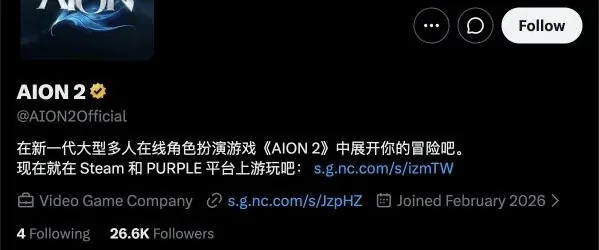
Match the profile handle reached through the Global website.
Bookmark the verified profile destination if you expect to use it regularly. This saves you from repeating a broad search every time maintenance, a new server, or an event becomes relevant. Keep the Global website bookmarked as well, because the website notice often contains details that do not fit in the social post.
If X asks you to sign in or does not load a timeline, continue through the game's News or Announcements page. You do not need to assume that the game has no notice merely because the social platform is inaccessible in your current browser.
Separate Global, regional, and community accounts
Several legitimate AION 2 pages can exist without serving the same audience. The Japanese official content site links its own regional social account, @AION2_JP. The Global site links @Aion2Official. Both can post game-related material, but an instruction from one should not automatically be applied to the other's service.
AION 2 NEWS, @AION2Community, presents itself as a community news source. Its feed can repost official material and help players discuss a server choice. That does not turn its own comments, recruitment links, or community Discord into official support instructions.
| Account or channel | What it is useful for | What to keep separate |
|---|---|---|
| @Aion2Official | Global publisher social posts and notice discovery | Short social text may not contain full terms |
| @AION2_JP | Japanese official communications and regional presentation | Language and operational context can differ |
| @AION2Community | Player discussion, community summaries, and repost discovery | Commentary is not a publisher commitment |
| Official Global website | Full announcements, event pages, and support routes | A page's current terms matter more than an old repost |
When a community feed shares an official post, open the original account and then its linked announcement. This preserves the distinction between the publisher's statement and the community's interpretation. It is particularly useful when a headline promises a transfer, reward, or new-server opportunity but the underlying text adds dates and restrictions.
Find a useful notice without reading every post
Choose the question you need answered before browsing. For example, you may need the name of a newly opened server, the opposing faction's matched server, a campaign's eligibility, or the full explanation of an upcoming feature. Those are different searches, even though all can appear on the same timeline.
A practical discovery sequence is:
- Open the verified Global profile.
- Look for posts naming the relevant feature, server, event, or date.
- Open the original post rather than a cropped screenshot.
- Read the complete text and any attached graphic.
- Follow the official notice destination when one is provided.
- Check for a later correction or follow-up before acting.
Use the account's available search controls when the timeline is long. Search for the distinctive server or feature name instead of a broad word such as update. If the social platform hides results behind login or offers incomplete history, use the Global site's News page to find the corresponding notice.
Do not assume a pinned post is the latest operational instruction. Pinning can prioritize promotion or a major announcement rather than chronological order. The post's date and the subject of the announcement still matter.
Read server announcements as instructions with context
The official feed includes commercial-launch server information and explanations of faction pairing. Each server houses one faction, and an Elyos server is paired with an Asmodian counterpart for shared PvP spaces such as the Abyss. An attached server graphic can therefore be more than a list of names: it describes whom your faction is matched against.
Read the region, faction heading, and pairing structure together. Selecting a name because a friend mentioned it is less useful if that name belongs to the opposing faction or a different region. When you coordinate with friends, compare the full server-and-faction combination rather than the server name alone.
The feed also includes a new-server post naming Hithanya for Elyos and Nemon for Asmodians in NA East. That is an example of a specific announcement, not a permanent list of every server currently available. A later expansion can add another pair, and creation availability can change independently of the social graphic.
Avoid treating an old social post as a live server-status panel. A statement that a server opened establishes the announcement at that time. It does not prove the server is currently online, unrestricted, or accepting every account. Use the client and the appropriate current notice for the action you are about to take.
Keep future features in the future until their window arrives
Short social posts often introduce a feature before its full terms are published. The new-server post, for example, says server transfers will be available in the future and that players will have a chance to rejoin friends. Read future language literally.
That message should not be expanded into a claim that a transfer is already usable, that every destination is eligible, or that all account storage will move. Open the detailed server-transfer notice to find the announced maintenance window, restrictions, currencies, and exclusions. Those details belong to the transfer decision itself.
A social reminder can also refer to a date in a different time zone. Preserve the stated zone when noting the deadline, then convert it for your own planning if necessary. Do not drop the zone and leave an ambiguous midnight or launch-day instruction.
If the date has passed, look for the follow-up confirming what happened. A scheduled start, expected maintenance duration, and confirmed availability are different states. The absence of a new post in your browser is not proof that the scheduled operation succeeded or failed.
Interpret event posts without inventing reward eligibility
The official feed mixes operational information with videos, community events, and promotional posts. A War for Atreia draft video can be useful for following the competition while providing no instruction for claiming an in-game reward. A game hashtag similarly identifies the conversation without establishing campaign terms.
Before treating a post as an actionable reward announcement, identify three things: what action is required, who is eligible, and when that action must happen. If those details are absent from the short post, open the full event page. Do not substitute a fan comment that says everyone gets the item.
For expired launch promotions, a repost remains historical evidence of the promotion. It does not reopen the claim period. Save the original date alongside a screenshot if you keep it for reference, because the image may circulate without the surrounding text later.
A streamer, creator, or community organizer can also publish a schedule tied to AION 2. Treat that person's participation instructions as their event information, not automatically as the publisher's account or reward policy. Follow the publisher's specific event destination when a game-account action is involved.
Build a notice-reading routine that matches your needs
You do not need every promotional video to stay informed about your own character. Focus on the kinds of changes that alter an action you plan to take: server choices, maintenance windows, campaign deadlines, platform support, or an upcoming account feature.
For each useful post, record the subject, date, affected region, and full-notice title. A simple bookmark or private note is enough. The goal is to avoid rediscovering the same announcement and accidentally using a different region's update when you return later.
When a post points to a long notice, read the sections that apply to your action rather than only the opening paragraph. A transfer notice may put storage exclusions below its purchase window; a campaign may place eligibility below the reward artwork. Social text normally serves as the entry point, while the detailed page governs the task.
If you follow multiple regional feeds, label them in your own bookmarks. That small distinction is especially helpful when the game name, artwork, and terminology are similar across services. It prevents a translated regional post from being mistaken for a Global rule change.
Handle missing posts and misleading screenshots
If a search result opens a post that is unavailable, try the verified profile and the game's announcement page. The immediate objective is to locate the original instruction, not to diagnose every possible reason X failed to show the post.
If a screenshot cuts off the handle, date, or linked notice, do not use it alone for a deadline or purchase decision. Search for the distinctive wording or server name on the official account. A screenshot can preserve a graphic while removing exactly the surrounding conditions that make it meaningful.
If two social summaries disagree, compare the original notices and their dates. A later correction can replace an earlier schedule; a regional post can legitimately describe a different service. Avoid combining the convenient parts of both into a rule that neither notice actually states.
If an account asks you to disclose credentials or authentication codes in a public reply, stop. The official site's Support route is the appropriate starting point for an account problem. A social display name and a copied logo do not authorize another person to take over your login.
Finish with the notice that governs your action
Use @Aion2Official to discover Global announcements, then complete your decision with the original detailed page. For a server choice, read the region and faction pairing. For a transfer, read the future window and eligibility. For an event, read the action, deadline, and reward terms.
The useful outcome is a verified account and a current instruction you can act on. Following a social feed is only the first step; matching the notice to your region and intended action is what prevents an old promotion or community interpretation from becoming the wrong plan.
Sources and verification
Reviewed for Global on October 10, 2026. The Global official site and the X profile point to the same account handle. Community accounts are separate from the publisher account.