
The AION 2 newsletter entry is on the official English teaser site. Open Join the Newsletter, review the required consent and follow the form; an NC account or Steam wishlist alone does not prove you subscribed.
Open the official English newsletter entry.
As of October 10, 2026, the Global site is presenting a launched game. The home page has Play now on Steam alongside Join the Newsletter. Opening the newsletter entry leads to the Launch Rewards section, where the subscription panel sits beside the reward artwork. That layout can make different actions look like one campaign. Keep them separate: email subscription is a communication choice, while a reward is governed by its own eligibility and claim conditions.
Open the official English newsletter entry
Start from the official AION 2 website and choose the English language version for Global. On the teaser home page, locate the purple Join the Newsletter entry next to the Steam button. Use that entry to reach the subscription panel rather than choosing a link that only opens the game store, an account login screen or a community discussion.
The entry belongs to the same official site that describes factions, classes, customization and the world. Its English address uses the en-us language path. A Korean, Taiwanese or Japanese campaign may have a different form, different notices and a different service context. If you play Global, do not use a regional campaign just because it has an English translation or appears near the top of a search result.
Check the destination before entering an email address or account details. A fan wiki can explain the route, but the actual signup belongs on the official publisher's page. A newsletter form should not ask you to install a preset file, pay a subscription fee or send an authentication code to another player. Those actions do not belong to the newsletter entry described here.
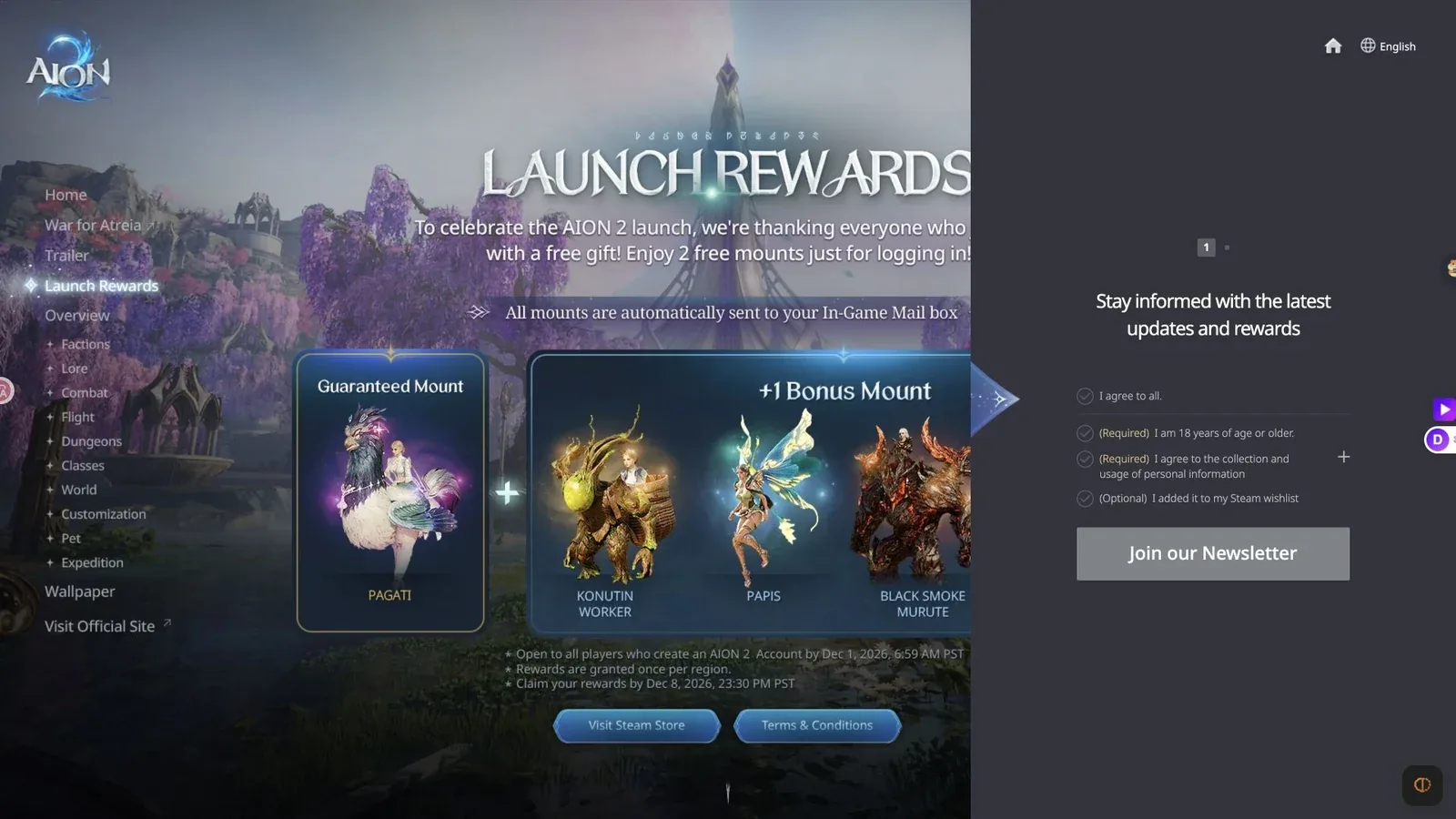
The current newsletter panel separates required age and personal-information consent from an optional Steam wishlist statement.
The pictured panel is the current official entry before any submission. It shows consent choices and a Join our Newsletter button. It is a useful recognition point, not a confirmation that the viewer or a particular account has already joined.
Read the consent choices individually
The panel presents an agree-to-all option, a required age declaration, a required agreement to collection and use of personal information, and an optional Steam wishlist statement. Read each item before deciding how to proceed. An agree-to-all control can include an optional preference, so it should not substitute for understanding the individual choices.
The age declaration says that the subscriber is 18 years of age or older. Only make that declaration if it is true. The personal-information choice is also marked required. Open the adjacent information control and read the notice on the site before deciding whether you want to provide the requested information. This guide cannot accept that notice on your behalf or turn an optional subscription into a required step for playing.
The Steam wishlist item is explicitly optional. It describes adding the game to a Steam wishlist; it does not state that a wishlist is a completed newsletter subscription. Steam and the publisher's email system are separate destinations. If you have already wishlisted the game, still use the publisher's newsletter process when your goal is to receive publisher emails.
Before the required choices are accepted, the entry button can appear disabled. That is consistent with the visible consent stage. It is not evidence that the campaign has closed, that your account is banned or that you must buy the game. Review the required fields and declarations that are actually present rather than repeatedly refreshing the page or clicking a grey button.
Complete the form and check the result
After reading the notices, continue through the current official form using an email address you control. Inspect each stage as it appears. The initial panel described here does not establish every later screen, whether a confirmation email will be required or how the site will label a successful submission. Follow the live instructions rather than expecting a particular hidden screen from an old guide.
If the site asks for an address, check it carefully before submitting. A missing character or an unintended address can send later messages somewhere else. If you use multiple inboxes for Steam, an NC account and game newsletters, choose deliberately; having access to one does not give you access to the others. Avoid assuming that the newsletter automatically uses whichever account happens to be signed in elsewhere.
Once you submit, read the response on the official page. Keep any confirmation message or email that the process provides. A click without a visible result is not sufficient evidence of completion. If the page asks you to confirm through email, complete that action from the official message. If it provides a different completion instruction, follow that instruction instead of waiting for an email that the form never promised.
You do not need to publish your address, confirmation link or account identifier to show that you signed up. Keep that information private. When asking support about a problem, describe the page and the stage where it stopped; provide account information only through the official support flow when requested.
Keep newsletter signup separate from rewards
The Launch Rewards artwork and newsletter panel share a section, but their proximity does not make every reward an email-signup reward. The current artwork describes gifts for logging in and says that mounts are sent to the in-game mailbox. Read the separate terms for your account and region when deciding whether a gift should be available.
Do not infer that clicking Join our Newsletter will send a mount to every character or instantly unlock an item. Equally, do not treat receiving a mount as proof that the email address was added to the newsletter. One action concerns messages outside the game; the other concerns eligibility and delivery inside the game. Their troubleshooting paths are different.
Historical pre-registration material can add another layer of confusion. A search result may still use a pre-register label even though the current home-page action is newsletter signup. Evaluate the current visible wording and the particular campaign terms. A surviving page element or old headline does not automatically reopen a historical qualification period.
When a reward is missing, first identify the reward by name, service region, qualifying action and stated delivery method. If the terms say in-game mail, search that mailbox rather than waiting for a newsletter email. If a message contains a specific claim instruction, follow that instruction. Avoid combining two unrelated offers into an unsupported promise.
Troubleshoot a newsletter email that has not arrived
Start by separating two situations: the signup never visibly completed, or it completed but an expected email is absent. In the first situation, return to the official form and check its current response. In the second, inspect the inbox you used and the type of message the process said it would send. Newsletter subscription does not imply that a new marketing message must arrive immediately.
Search the inbox, spam folder and any promotions category for AION 2 and publisher-related messages. Check other addresses only if you may have used them during signup. A browser signed into a different mail account can make an email appear missing even when it reached the intended destination. If a message is in spam, examine the sender and destination links before trusting it.
If a confirmation action is still outstanding, complete it using the official message rather than starting many duplicate signup attempts. Repeated submissions can make it harder to identify the relevant confirmation and do not establish that the first attempt failed. If no confirmation was promised, lack of a confirmation email alone cannot establish a failure.
For delivery problems that persist, use the official support route linked from the publisher's site. Record the date of the attempt, the language version and the stage you reached. Explain whether you saw an on-page success response, an error or no response at all. Those details distinguish a form problem from an inbox-filter problem without guessing at the publisher's internal mailing system.
Manage later messages and opt out
When a newsletter arrives, read the message footer for its subscription-management or unsubscribe route. Use the instructions in the authentic message if you want to stop receiving that category of email. Do not assume that deleting one email removes the subscription; deletion only changes your inbox.
Similarly, unfollowing a social account or removing AION 2 from a Steam wishlist does not prove that the publisher's email subscription ended. Those services have their own preferences. Manage the newsletter through its own route and manage social or store notifications separately when you want to change both.
If an unsubscribe flow gives a completion response, retain that response until you are satisfied the requested preference was recorded. Allow for any instructions shown there. This guide does not establish the publisher's processing time or promise that every account-related message stops, because service notices and marketing preferences may be governed differently.
Avoid sending password resets or account changes just to fix a marketing preference. If you cannot identify a valid management link, ask official support how to update the relevant subscription. State that the request concerns the AION 2 newsletter so it is not mistaken for deletion of your game account.
Choose the right channel for urgent game information
A newsletter is useful for selected updates and offers, but it should not be your only route when you need an immediate operational notice. Use the official website's news and the game's official Steam announcements for maintenance, current service changes and specific product terms. Read the full announcement rather than relying on an email subject line.
For community discussion, use the official channels linked from the game's site. They can help you locate a notice, but another player's statement is not a substitute for that notice. If two messages appear to disagree, compare service region, publication date and the exact campaign being described before taking action.
A practical completion check is straightforward: you used the Global English entry, read the required and optional choices, finished whatever the live form requested, and inspected its completion response. Keep that result separate from Steam wishlisting, game-account creation and in-game reward claims. This makes later troubleshooting much more precise and prevents a missing marketing email from being mistaken for a missing game entitlement.
Sources and verification
Reviewed for Global on October 10, 2026. The Global official entry and the initial consent screen were checked. No subscription was submitted, so later confirmation steps and reward eligibility are not presented as verified.