The confirmed official Global AION 2 Discord uses the invite code aion2official. NC Community identifies that destination in a developer-marked, pinned Steam post. The official Japanese community route uses FFE9VNKqhF and appears on the AION 2 Japan-operated website.
Publisher-Linked Communities
Those two routes serve different language needs, but they do not represent two separate games. The Japanese community supports the same Global PC product linked to Steam. Fan servers also exist, including communities with short or convincing invite names, so the invite text alone is not proof of publisher affiliation.
| Route | Invite code | Affiliation | Best use |
|---|---|---|---|
| Global official server | aion2official | Confirmed by an NC developer-marked Steam post | Global news, events, official communication, and player discussion |
| Japan-operated official community | FFE9VNKqhF | Linked by the official AION 2 Japan website | Japanese-language community information and regional communication |
| Independent fan communities | Varies | Not operated by NC unless explicitly proven otherwise | Additional discussion, recruitment, guides, or language-specific groups |
Discord invite availability can change. The official affiliation of aion2official is established, but its invitation can expire or be unavailable to a particular user. If an invite fails, recover it from an official AION 2 property instead of substituting a similarly named community link.
Official Global AION 2 Discord
The official Global server is the appropriate starting point for most English-speaking AION 2 players. NC Community describes Discord as one of its main ways of communicating with the community and directs players there for news, events, current discussion topics, and conversation with other players. The Global Launch FAQ also directs players who encounter a bug to the official Discord’s bug-reports channel.
The important identifier is the invite code aion2official. Do not reduce verification to whether a server uses the AION 2 logo, has many members, or contains polished announcement channels. A fan administrator can reproduce those surface details. The stronger check is whether an NC-controlled or developer-marked property sends you to that exact destination.
A practical verification route is available through the AION 2 Steam Community area:
- Open the official AION 2 game hub on Steam.
- Enter its Essential Info and Resources discussions.
- Find the pinned post titled AION 2 Official Discord Server.
- Confirm that the author carries the developer marker and that the destination uses
aion2official. - Open the invitation from that post rather than copying a code from an unrelated guide, comment, video description, or direct message.
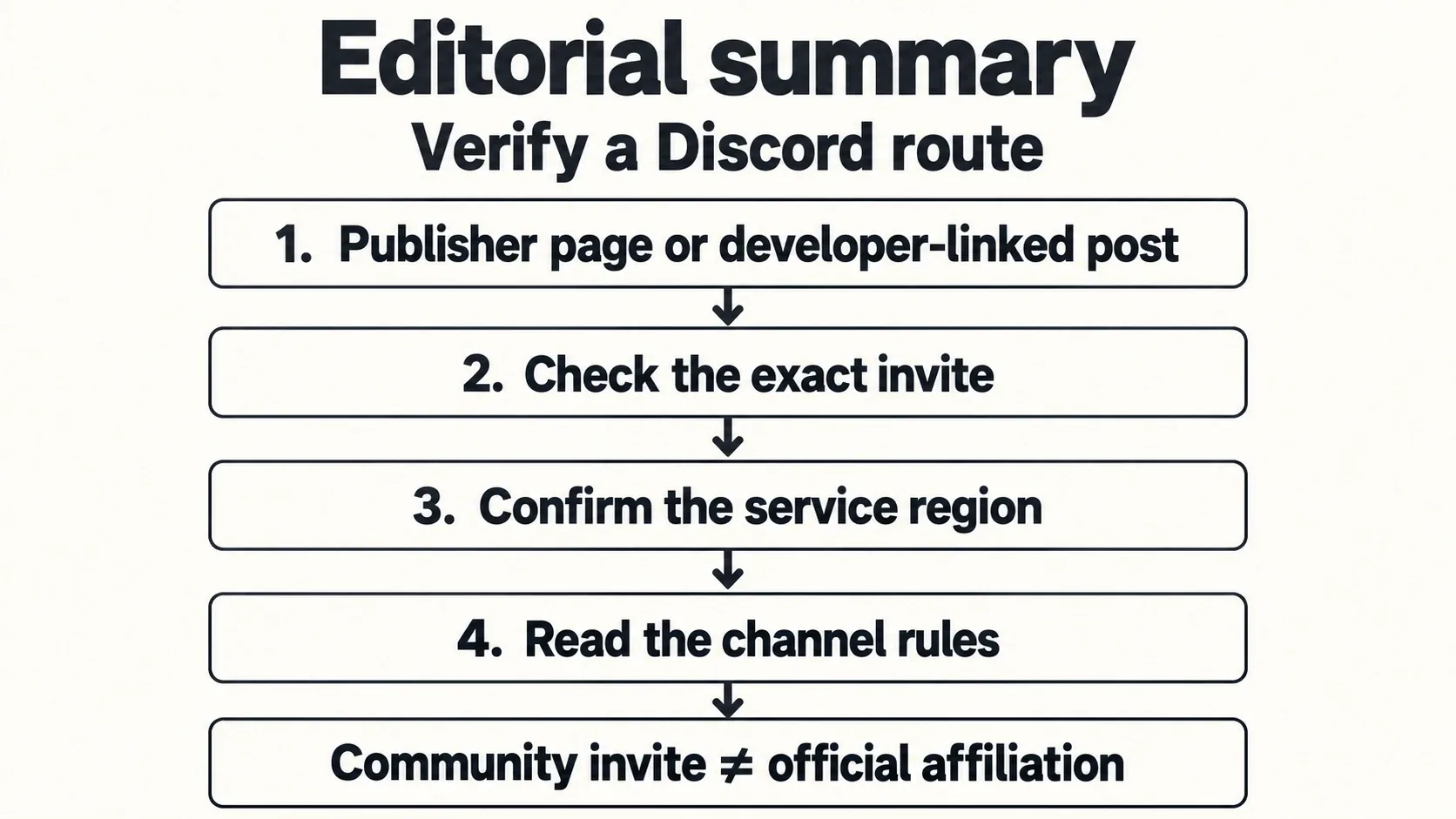
Editorial verification flow for identifying the appropriate community invitation.
The Steam post also provides versions of its message in German, French, Spanish, Portuguese, and Japanese. That confirms multilingual publication of the invitation notice; it does not by itself establish which language channels, translation bots, or support services currently exist inside Discord. Channel names and onboarding options can change after this guide is published.
Global AION 2 launched on October 5, 2026, for Windows PC through Steam and PURPLE. Both PC entry points use the same content and shared servers, so Steam and PURPLE players do not need different official Discord communities. Questions about installing either client or linking accounts belong to the platform-specific guides; the Discord destination itself is not split by launcher.
Japan's Official AION 2 Discord Route
Players who want the Japan-operated official community should use the invite code FFE9VNKqhF. It is linked directly from the social navigation on the official AION 2 Japanese website alongside the service's Steam, YouTube, X, LINE, Instagram, and TikTok destinations.
This route should be described accurately: it is an official regional community for Japanese-language operations within Global, not evidence of a fourth independent AION 2 service. The same official website points visitors to the Global AION 2 site and the same Steam application used by the Global PC release.
Choose this route when Japanese-language announcements, broadcasts, or regional community conversation are more useful to you. Choose the main Global server when you want the broad Global community destination identified by NC Community. Joining both is reasonable if you actively follow both sets of communication, but information should still be checked for its intended region and date.
Do not assume that a notice appearing in the Japanese community automatically describes Korea or Taiwan. Those earlier services can have different progression, classes, level limits, events, and update timing. Likewise, a Japanese-language post about the Global PC product should not be mislabeled as evidence for a separate Japanese game edition.
How to Join Without Using a Bad Invite
Use this short verification process whenever you encounter an AION 2 Discord link outside an official property.
- Choose the community you actually need. Use
aion2officialfor the official Global community orFFE9VNKqhFfor the Japan-operated official route. Do not choose solely by which invite name looks shorter or more memorable. - Trace the invitation back to an official surface. For Global, use the developer-marked pinned Steam post. For Japan, use the Discord entry in the official Japanese site's social navigation.
- Compare the complete invite code. Similar phrases such as
aion2,aion2global, or a server name containing “Official” are not interchangeable withaion2official. A familiar-looking name is not proof of ownership. - Inspect the Discord preview before accepting. Confirm that the destination is presented as the community you selected. If the preview shows a different language, unrelated game, generic trading group, or unexpected administrator brand, stop and repeat the official route.
- Treat member totals as context, not verification. Counts change constantly and can be quoted inaccurately by secondary guides. A large server can still be independently operated, while a regional official server can be smaller.
- Complete only the onboarding shown inside the destination. Rules, role selection, and channel visibility may change. Follow the visible welcome prompts rather than assuming a fixed verification workflow.
- Keep the official entry point bookmarked. If an invitation later expires or redirects unexpectedly, return to the Steam post or Japanese official site rather than searching for a replacement code in old comments.
This process matters because several AION 2 Discord destinations circulate publicly. Some are useful fan communities, but usefulness and official status are different claims. The safest approach is to verify affiliation first and decide whether the community fits your needs second.
Official and Fan Communities Serve Different Roles
An independent Discord is not automatically fraudulent or low quality. Fan communities can provide language-specific chat, legion recruitment, group finding, community guides, or a more relaxed discussion environment. They simply should not be presented as publisher-operated unless an official AION 2 property establishes that relationship.
One public community invitation uses the code AION2. Its creator explicitly described the server as an independent West and Southeast Asia community and stated that it was not affiliated with the publisher. That disclosure makes the distinction clear: it may be a community option, but it is not a replacement for aion2official when you need publisher communication.
A community-maintained wiki also lists FpJeesy8qj as an AION 2 Discord destination. That listing does not establish NC affiliation. Treat it as a third-party community route unless a current official property independently identifies it.
Use these tests when classifying any server:
- Official Global: an NC-controlled or developer-marked AION 2 property points to it.
- Official regional: a verified regional AION 2 operation links it and clearly identifies the applicable audience.
- Fan community: organizers identify it as independent, or no publisher relationship can be established.
- Unresolved: the only evidence is a Discord shell, search result, reposted invitation, server branding, or an unsupported “official” label.
Do not repeat exact population claims when choosing between communities. Membership changes, and an older article may have counted users before Global launch. Select a server based on affiliation, language, moderation style, and the activity you need rather than an unverified leaderboard.
Finding Current Information After Joining
Discord is useful only when the message you find matches the current service and date. Global officially launched on October 5, 2026. The September 30 paid Early Access period and the September 17–18 scale test have ended. Posts written for either prelaunch phase can remain visible even when their instructions no longer apply.
Use a simple reading order inside any AION 2 community:
- Start with publisher announcements or developer-marked messages.
- Check the message date and whether it predates the October 5 Global launch.
- Identify the named service: Global, Korea, or Taiwan.
- Confirm whether the post discusses Steam, PURPLE, or an earlier regional client.
- Separate confirmed rules from player reports, predictions, and copied translations.
- Recheck time-sensitive details before spending money, changing an account, or planning around maintenance.
The Global launch currently centers on eight classes and level 45. Later Korean and Taiwanese material can discuss level 50, Brawler, and other subsequent content that should not be treated as the current Global baseline. Experienced regional players may still offer valuable advice, but their build details, rewards, event schedules, and progression rules require a Global version check.
Discord also does not convert a scheduled maintenance estimate into proof that every server is online. A visible community, an active chat, or a moderator reply cannot confirm live service availability by itself. Use the dedicated server-status information when the actual task is determining whether a game server is up, under maintenance, or experiencing an incident.
Similarly, community posts about codes, classes, builds, Twitch Drops, payment, installation, or account association may help identify a problem, but each topic has its own rules and version risks. Use Discord to locate current discussion and official notices, then use the dedicated guide for the complete task.
Fixing Common Discord Invite Problems
Invalid or expired invitation
First verify that you entered aion2official or FFE9VNKqhF exactly. If the correct code fails, do not assume a similarly named invitation is its successor. Return to the pinned developer post or the official Japanese website and use the destination currently published there. Invitation availability can change independently of the server's established affiliation.
Unexpected server preview
Cancel the join if the preview does not match the route you selected. Reopen the invitation from its official entry point. A search engine result, shortened redirect, repost, or old social comment can point somewhere other than the current official destination.
Joined server with few visible channels
Read the visible rules and onboarding prompts. Discord communities can hide channels until a user acknowledges rules or chooses roles. Because the exact setup is not confirmed here and can change, follow only the options displayed by the server itself. Do not grant an outside bot unrelated account permissions merely to reveal channels.
Information appears to contradict another server
Compare region, patch timing, and authority before choosing an answer. A Global announcement should take priority for the current Global service. A Korean or Taiwanese explanation may describe a later regional build, while a fan post may be an interpretation rather than a confirmed rule.
An invitation arrives through a direct message
Verify it independently through Steam or the official Japanese website. Do not rely on the sender's display name, role color, avatar, or claim of being staff. Never disclose account credentials, one-time authentication codes, backup codes, or payment details to someone offering access, rewards, support, or moderation help.
Useful Notification and Safety Setup
After joining, configure Discord around the information you actually need. Follow the server's official announcement area if Discord offers that option, keep launch or maintenance notices visible, and mute high-volume general chat if it obscures important updates. Notification controls are personal settings; they do not affect whether you remain a member.
For time-sensitive posts, read the stated timezone and service region before converting the time locally. A converted clock time does not change whether your account is eligible for a regional activity. Confirm the date as well as the hour, especially when messages cross midnight in another timezone.
Treat community tools, damage meters, add-ons, automation, and download links as separate trust decisions. Presence in an AION 2 Discord does not prove that NC officially approves a tool. Verify current publisher rules and the tool's applicable game region before installing software or connecting an account.
Keep official announcements distinct from community advice in your own bookmarks. This makes it easier to recover the authoritative message when a screenshot is cropped, a quoted post loses its date, or a discussion mixes Global information with older Korean or Taiwanese details.
Best Discord Route by Goal
| Player goal | Best starting route | Important limitation |
|---|---|---|
| Receive Global official communication | Global official server via aion2official | Invite availability and channel layout can change |
| Follow Japanese-language official communication | Japan-operated route via FFE9VNKqhF | It is a regional Global community, not a separate game service |
| Find extra discussion or legion recruitment | A clearly labeled fan community | Do not treat community claims as publisher announcements |
| Verify an invitation's affiliation | Developer-marked Steam post or official Japanese site | Branding and member count alone are insufficient |
| Check whether game servers are currently online | Dedicated server-status route | Active Discord chat does not prove game-server availability |
| Research a rule or build | Current Global announcement plus the relevant guide | Older KR/TW advice may not match Global |
The two official identifiers to retain are straightforward: aion2official for the main Global AION 2 Discord and FFE9VNKqhF for the Japan-operated official community. Verify them through their official entry points whenever an invitation behaves differently from expected, and label every other community according to the affiliation that can actually be established.
Next Guides
Use alternative discussion routes, coordinate a server, or check a dated incident notice.