
AION 2 is available through Steam for the Global Windows PC service. The game officially launched on October 5, 2026, after its paid Early Access period ended, and the Steam app is now the regular free-to-play release rather than a test or head-start client. Steam and PURPLE provide the same in-game content and connect to the same servers.
Client and Account Links
The important decision is not which client has exclusive content—neither does—but whether you want to remain on Steam or preserve the option to access the same characters through PURPLE. You can play through Steam without linking it to an existing PURPLE account. If you want the same characters and progress on both clients, however, the accounts must be linked correctly.
This guide covers that platform and account relationship. Installation errors belong to the separate download guide, while current server availability, monetization details, and console plans require their own current checks.
AION 2 on Steam at a glance
| Item | Global Steam version |
|---|---|
| Current status | Officially launched on October 5, 2026 |
| Steam app ID | 3393110 |
| Entry price | Free to play, with optional paid products inside the service |
| Officially supported system | Windows PC |
| Other Global PC client | PURPLE, NCSOFT’s proprietary platform |
| Steam and PURPLE content | The same in-game content |
| Server population | Shared between Steam and PURPLE users |
| Cross-client progress | Available when the relevant accounts are linked |
| Controller status | Playable with a controller, but controller use is not officially supported |
| Linux and Steam Deck status | No official support; only Windows PC through Steam or PURPLE is officially supported |
Do not confuse this listing with the original AION. The correct Steam identity is AION 2, and the app ID is a useful extra check when similarly named community pages, guides, or search results appear.
Steam provides the familiar library entry, update delivery, community hub, screenshots, guides, and user reviews. Those Steam features sit around the game, but they do not create a separate Steam ruleset or a Steam-only server population. Once inside the Global service, Steam users share the game world with PURPLE users.
Steam versus PURPLE
Choosing between Steam and PURPLE is mainly a launcher and account-access decision. It is not a choice between two editions with different quests, classes, dungeons, or combat systems.
| Decision point | Steam | PURPLE |
|---|---|---|
| Launcher owner | Valve | NCSOFT |
| Global game content | Same AION 2 content | Same AION 2 content |
| Servers | Shared with PURPLE | Shared with Steam |
| Steam library features | Available | Not part of the PURPLE client |
| Standalone access | You can begin through Steam without linking an existing PURPLE account | Uses the NCSOFT platform |
| Same progress on both clients | Requires account linking | Requires account linking |
| Official operating-system support | Windows PC | Windows PC |
Steam is the straightforward choice if you want AION 2 in your existing Steam library and do not expect to switch launchers. PURPLE is the native NCSOFT client. Neither client gives you a different Global world, and choosing Steam does not isolate you from players who chose PURPLE.
If friends use different launchers, the launcher difference alone does not prevent you from sharing the same server environment. Server, region, and faction choices can still affect where characters are located, but those are service-level decisions rather than a Steam-versus-PURPLE split. Check those choices before committing time or paid entitlements; the launcher cannot automatically correct a character created in the wrong place.
The same-content statement also has limits. It means Steam and PURPLE users enter the same Global game service. It does not mean the older Korean or Taiwanese services share characters with Global, and it does not make every platform-level feature identical. Steam retains its own library and community layer, while PURPLE remains a separate launcher.
Steam and NC account association
You do not need to link Steam to a PURPLE account merely to start playing through Steam. Linking becomes necessary when your intended result is to open the same AION 2 character and progress through both PC clients.
Use this decision path before changing clients:
- Choose Steam-only or cross-client access. If you plan to stay on Steam, an existing PURPLE link is not required just to play. If you want to alternate between Steam and PURPLE, treat linking as a prerequisite rather than assuming the clients will discover each other automatically.
- Identify the NC account you intend to keep. Account-linked rewards and services follow the associated NC identity. Do not link casually to an old account merely because it is already signed in within a browser.
- Review the current association. The official NC account area exposes account-link information under My Page > Manage Login. Confirm the displayed identity before claiming account-linked rewards or expecting cross-client continuity.
- Link before expecting shared progress. The official rule is that the same character and progress can be accessed on both platforms when the accounts are linked. An unlinked Steam session should not be treated as proof that a separate PURPLE login will show the same character.
- Verify the character after linking. Confirm the expected server, faction, character name, and progress before purchasing anything or continuing a long session through the second client.
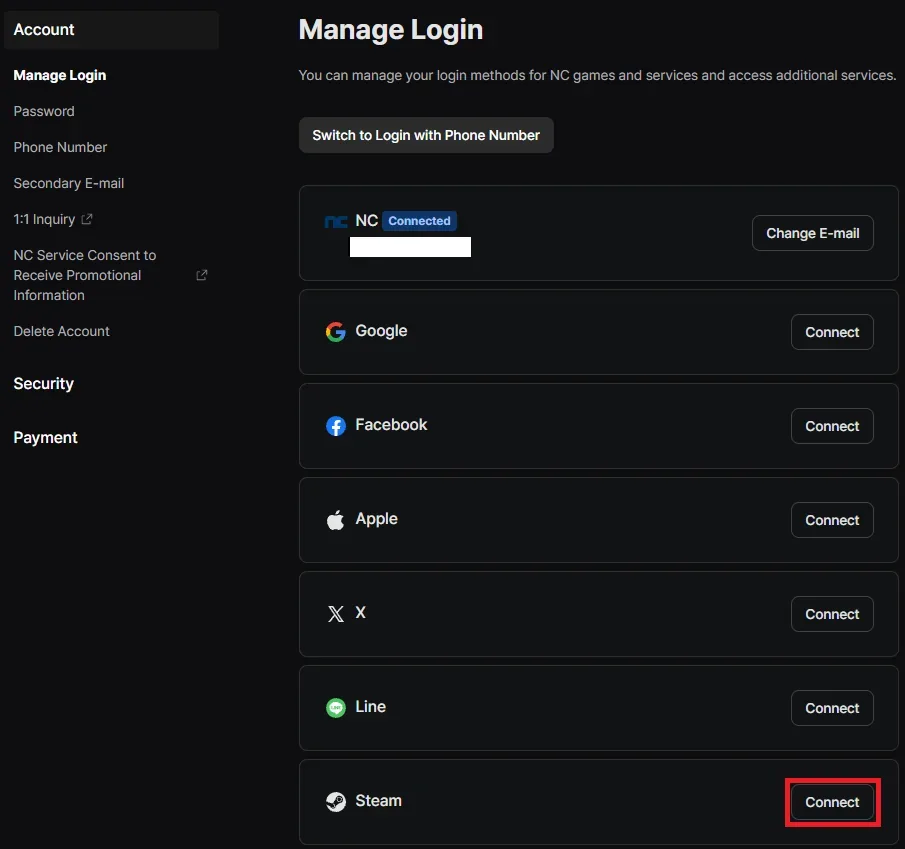
Use Manage Login to verify or connect the Steam account before expecting shared progress.
If you already created a character and the expected account does not appear, stop before deleting an account or character. A community workaround can be outdated, can target the wrong identity, or can remove progress and purchases. Record the Steam account, NC account, server, and character involved, then use official support or the official Discord bug-report channel. Account deletion is not a safe first troubleshooting step.
The linking rule is also relevant to Twitch Drops, although detailed campaign instructions belong to the dedicated Drops guide. Rewards go to the NC account linked to Twitch. If Twitch was previously connected to a different NC account, the reward may be delivered there instead of the account currently used through Steam. Checking My Page > Manage Login is therefore more useful than repeatedly reopening the Steam client.
A safe Steam starting sequence
The following sequence keeps platform and identity decisions separate from installation troubleshooting:
- Confirm the listing. Check that the product is AION 2 and, when necessary, verify Steam app ID 3393110. Avoid the original AION listing or an unrelated community download.
- Confirm Global eligibility. A converted local launch time does not establish that every country is eligible for the Global service. Availability is a service-region question, not merely a timezone calculation.
- Decide whether PURPLE access matters. If Steam will be your only client, proceed without forcing a link to an existing PURPLE account. If both clients matter, resolve the account association first.
- Check the signed-in identities. Pay attention to both the active Steam account and the NC account visible in the official account area. Shared computers and multiple browser profiles make accidental mismatches easy.
- Enter the intended server and faction. Steam and PURPLE share servers, but that does not merge separate characters, regions, servers, or factions.
- Confirm the expected character state. Before spending money or claiming limited account-linked rewards, verify that the character shown is the one you intend to keep.
- Separate account problems from client problems. A missing character after changing launchers points first to account association or service selection. A failed download, missing file, or update loop belongs to Steam or client installation troubleshooting.
This sequence intentionally avoids promising exact menu labels inside the game. Interface wording can change, while the core rule remains stable: Steam works by itself, and linked access is needed when the same progress must appear through PURPLE.
Windows, controller, and Steam Deck support
The Global version is officially supported on Windows PC through Steam and PURPLE. This support statement should not be expanded into unsupported platform promises.
AION 2 is playable with a controller, but NCSOFT does not describe controller play as officially supported. That distinction matters when evaluating button prompts, remapping, launcher navigation, or a controller-specific bug. “Playable” means the game can accept controller use; it does not guarantee a fully supported console-style interface or dedicated troubleshooting for every device.
Linux and Steam Deck are in a similar evidence-sensitive category. NCSOFT only commits official support to Windows PC through Steam and PURPLE. Reports that a compatibility layer can launch the game do not turn Linux or Steam Deck into supported platforms. Third-party success may also change after a client, anti-cheat, or operating-system update.
Use these expectations when choosing hardware:
- Choose Windows PC when you need the documented support path.
- Treat controller use as available but unofficially supported.
- Treat Linux, Proton, and Steam Deck results as third-party experiments rather than publisher commitments.
- Do not assume the Steam release implies a native SteamOS build.
- Do not infer console availability from controller playability; console plans are a separate topic.
Global languages and service separation
The Global client supports English, Japanese, and Korean voice-over. Its interface and subtitles support English, French, German, Spanish from Spain, Brazilian Portuguese, Russian, Japanese, and Korean. The in-game language can be changed from the language section of Settings.
These language options do not determine where your progress lives. Language, launcher, and regional service are separate layers:
- Language changes voice or interface presentation.
- Launcher determines whether you enter through Steam or PURPLE.
- Account association determines whether both launchers can reach the same Global progress.
- Service region determines the applicable Global environment and available servers.
- Korean and Taiwanese services remain separate from Global.
Progress from the Korean or Taiwanese version does not carry into the Global version. Linking Steam and PURPLE only addresses access within the Global service; it is not a migration tool for characters created in Korea or Taiwan.
Historical Steam phases
Several older search results describe Steam wishlisting, the September 17–18 Launch Scale Test, or paid Early Access beginning September 30. All of those stages have ended.
The Launch Scale Test was a temporary infrastructure test, not the current live state. Early Access provided Founder’s Pack owners with a five-day head start and retained progress into release, but it also ended when the official launch arrived on October 5. A current Steam player should use the normal live client rather than look for a test registration, beta key, or head-start server entry.
Founder’s Pack products and their historical rewards are handled separately because their availability and entitlement rules are not the same as ordinary Steam access. Their existence does not mean a pack is required now. The live Global game is free to enter, while optional membership, Battle Pass, cosmetics, and player-economy access involve separate monetization decisions.
Steam community information and support boundaries
The Steam community hub can help you find screenshots, guides, reviews, and discussions tied to the correct app. It is useful for identifying common player questions, but a popular review or guide is not automatically an official policy statement. Early reviews also mix personal preferences, launch-week conditions, and sometimes pre-release rules.
Apply a simple source order when a Steam discussion conflicts with account or platform policy:
- Use current NCSOFT notices and the official Launch FAQ for platform, linking, and support rules.
- Use the Steam product and community pages to confirm the app identity and inspect Steam-specific activity.
- Treat user reviews and guides as player reports unless they reproduce a current official rule accurately.
- Avoid carrying Korean, Taiwanese, original AION, test-era, or Early Access behavior into the current Global Steam release without confirmation.
Do not use a single community-page snapshot as a permanent player-count claim. Concurrent users and review totals change continuously, and the dedicated Steam Charts page should own any dated population analysis.
For support, route the problem by ownership. Steam library, download, update, and local Steam-client problems begin with Steam-side troubleshooting. Missing characters, account links, rewards delivered to the wrong NC identity, or in-game bugs require NCSOFT support context. The official Discord also provides a bug-report channel, but public chat should never receive passwords, recovery codes, payment details, or other private account information.
The practical result is simple: use Steam confidently if you want one familiar Windows launcher, and link deliberately if you want the same Global character through PURPLE. Confirm identities before claiming rewards or spending money, keep Korean and Taiwanese progress separate, and do not treat unofficial device compatibility as official platform support.
Next Guides
Continue to installation, the separate population question, or current console availability.