
AION 2 Global is available as a free-to-play Windows PC game through two official routes: Steam and NC's PURPLE platform. Steam app 3393110 is the correct Steam product, while PURPLE users should get the launcher and game through NC's official Global pages. Both editions provide the same in-game content, connect to the same servers, and do not require a Founder’s Pack now that the October 5, 2026 launch has occurred.
Official Download Routes
Do not use the Korean or Taiwanese Google Play listing as a Global PC installer. The Global service is officially supported on Windows PC through Steam and PURPLE; the existence of mobile versions in other regions does not establish a Global mobile release. Third-party fan sites and standalone download pages are also unnecessary installation routes.
No verified exact Global download size, installed size, or universal hardware requirement is available here. Check the live space estimate shown by Steam or PURPLE before confirming the installation, and leave additional free space for unpacking and later patches.
Official AION 2 download routes
Your platform choice does not change AION 2's playable content or server pool. It mainly determines which desktop client manages the installation and which account flow you use when launching the game.
| Route | What you install | Account used | Content and servers | Main consideration |
|---|---|---|---|---|
| Steam | AION 2 from Steam app 3393110 | Your Steam account; NC linking is optional for ordinary Steam play | Same Global content and shared servers | Convenient if you already manage games through Steam |
| PURPLE | The Windows PURPLE client, followed by AION 2 Global | An NC account | Same Global content and shared servers | Direct access through NC's own desktop platform |
Steam players do not have to link a PURPLE account merely to start playing. Account linking matters if you want the same AION 2 character and progress to be accessible through both Steam and PURPLE. Shared servers alone do not mean that two unrelated accounts automatically share characters.
Choose one route for the initial installation unless you specifically intend to use both clients. Installing both does not unlock separate content, and it consumes additional storage and download time. If friends use the other launcher, you can still play together because Steam and PURPLE players share the same servers. Region and server selection remain separate decisions after installation.
Install AION 2 through Steam
Steam is the simplest route when Steam is already installed and signed in on your Windows PC. Confirm that the page is for AION 2, published for the Global service, and associated with app 3393110. This helps distinguish the current game from the original AION, unrelated search results, and pages for different regional services.
- Open the Steam desktop client and sign in to the Steam account you intend to use.
- Search for AION 2 and verify the product before beginning the download. The listing should identify the game as free to play rather than requiring an old Early Access package.
- Add or start the game installation using the current Steam control displayed on the product page.
- Select an installation drive with enough free space for the displayed download, unpacking, and future updates. Do not rely on an old size quoted by a test-era guide.
- Allow Steam to finish both the download and installation. A completed download is not necessarily ready to launch while disk installation or a follow-up update is still running.
- Start AION 2 from the Steam Library. Complete any first-launch account or service prompts shown by the current client.
- Select the intended Global region and server inside the game. Coordinate this choice before creating characters if you plan to play with friends.
The September Launch Scale Test and the September 30 Founder’s Pack head start are over. Instructions that tell you to request test access, preload a test client, or buy a pack for five-day access are historical and should not be used for the current installation.
If Steam opens but AION 2 does not appear in search, check that the store region and account are eligible for the Global service. Service eligibility is not determined only by changing a clock or converting the launch time into your local time. Do not substitute a Korean or Taiwanese mobile listing when the Global Steam product is unavailable.
Install AION 2 through PURPLE
PURPLE is NC's proprietary desktop platform and is the other official Windows PC route for AION 2 Global. Obtain the PURPLE client from NC's official AION 2 or PURPLE destination rather than from a mirror, reposted installer, or fan database.
- Open NC's official Global AION 2 destination and follow its PURPLE option to the official Windows client.
- Download and run the PURPLE installer.
- Sign in with the NC account you want associated with AION 2. If you already use NC services, confirm the account identity before creating a new one.
- Locate the Global version of AION 2 inside PURPLE. Avoid selecting a Korean or Taiwanese service solely because it has a similar title or an earlier release history.
- Begin the installation and choose a directory with enough free space for the current estimate plus patching overhead.
- Wait until PURPLE finishes downloading, installing, and applying any available update.
- Launch the game through PURPLE, then choose the appropriate Global region and server.
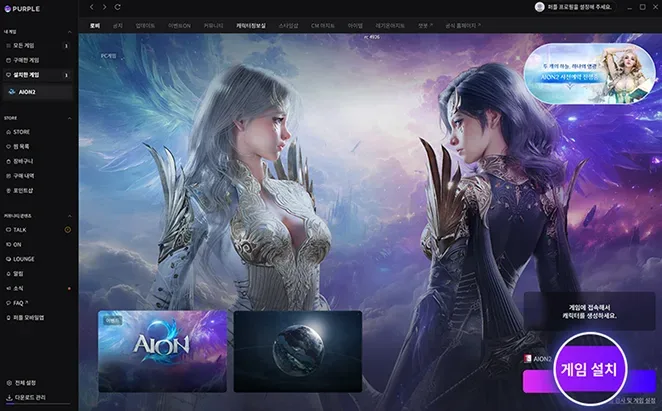
Korean-language PURPLE interface example showing the installation button. Use the Global download links in this guide to choose the correct service.
The exact wording and placement of PURPLE controls can change with client updates. Use the official AION 2 game entry and the installation control currently shown by the client instead of following an old screenshot blindly. If the game entry is missing, first confirm that PURPLE is signed into the intended NC account and is displaying a Global-supported service region.
Steam and PURPLE account linking
Linking is optional if you plan to stay on Steam. The official Launch FAQ states that Steam can be used without linking a PURPLE account. However, accessing the same character and progress from both platforms requires the accounts to be linked.
Decide on this before dividing playtime between two unrelated accounts. Creating a character through Steam and another through an unlinked NC account does not create cross-client progression merely because both clients connect to shared servers.
Account linking for AION 2 is also distinct from Twitch account linking. Twitch rewards are delivered to the NC account connected to Twitch; a previously linked NC account can therefore receive rewards instead of the account currently used through Steam. That reward issue does not mean the game client was installed incorrectly.
Progress from the earlier Korean or Taiwanese versions does not carry into AION 2 Global. Installing PURPLE and signing into an older regional account does not transfer those characters, items, or progression to the Global service.
Supported PC platforms and input limits
Official Global support currently covers Steam and PURPLE on Windows PC. The publisher notes that AION 2 may run on other platforms or devices, but that possibility is not the same as official support.
Linux and Steam Deck should therefore be treated as unsupported configurations even if community compatibility methods can start the game. Third-party Proton reports do not establish official Linux support, and a later game or anti-cheat update may change whether an unofficial setup works.
The same boundary applies to macOS: the two confirmed Global download routes are Windows PC clients. Do not download an unofficial Mac package that claims to be a native Global installer.
AION 2 can be played with a controller, but controller use is not officially supported. That means the game being launchable with a controller should not be read as a guarantee that every interface, prompt, or troubleshooting case is covered by publisher support.
Fix a download that will not start
Work through the symptom that matches your client instead of repeatedly downloading new installers.
The install control is missing
Confirm that you are viewing AION 2 Global rather than the original AION, a regional mobile release, or an obsolete test page. On Steam, verify app 3393110. On PURPLE, return to the official Global AION 2 entry and confirm the signed-in account and service region.
If the correct product is visible but installation is unavailable, service eligibility may be the cause. Changing the Windows time zone does not grant access to a region where the service is not offered. Use the official Global route applicable to your location rather than a third-party installer.
The download remains at zero or repeatedly pauses
Pause and resume the download once, then restart the affected client if no progress appears. Confirm that the installation drive is connected, writable, and has more free space than the live estimate. Downloads may need extra temporary space while files are unpacked.
Check whether another large download is consuming the connection. A VPN, proxy, security product, or restrictive network can also interrupt launcher traffic; test without unnecessary intermediaries when it is safe to do so. Do not disable system protection permanently just to force an installer to run.
Steam finishes downloading but the game will not install
Let Steam complete any disk activity displayed in the Downloads view. If the installation remains damaged, use Steam's current file-verification function for AION 2 rather than deleting the entire game immediately. Menu labels can vary by Steam version, but the verification control is normally associated with the game's installed-file properties.
If verification cannot complete, check free disk space and write permission for the selected Steam library. Moving the installation through Steam's own storage controls is safer than manually dragging partially installed folders.
PURPLE stops while patching
Close and reopen PURPLE, sign back into the same NC account, and resume from the AION 2 Global entry. Verify that the target directory is writable and that security software has not quarantined part of the launcher or game installation.
Do not assume a generic repair button exists under a particular label or menu when following an old guide. Use the recovery or file-check option actually presented by the current PURPLE client. If no such control appears, preserve the installed files and consult official support before removing a large download.
Fix launch and login failures after installation
A successful installation does not guarantee that the live service is available at that exact moment. Separate client problems from server or maintenance conditions before reinstalling.
- If the launcher itself will not open, restart Windows, start the official client again, and check whether its files were blocked or quarantined.
- If the launcher opens but AION 2 closes before the login screen, verify files through the platform, install pending Windows updates, and restart before attempting a full reinstall.
- If the client reaches login but rejects the account, confirm whether you launched through Steam or PURPLE and whether you are signing into the intended account. Account confusion is not repaired by downloading the game again.
- If character progress appears missing after switching platforms, check whether the Steam and NC accounts were linked for shared character access and whether the same Global region and server were selected.
- If login fails during announced maintenance or a broad service interruption, wait for a confirmed service update. Reinstalling cannot repair a server-side outage.
For an unresolved bug, the publisher directs players to the official AION 2 Discord bug-report route. When reporting it, include the platform, the stage where the failure occurs, the exact error text, and whether file verification changed the result. Avoid posting passwords, recovery codes, or other account secrets.
Avoid incorrect AION 2 installers
The correct Global PC download choices are Steam and PURPLE. Several similarly named destinations can send you toward the wrong product or service:
- The Google Play listing belongs to a regional mobile release and is not evidence of a Global Android client.
- A fan site using an AION 2 domain is not an official Global publisher download route.
- Original AION installers do not install AION 2.
- Scale-test and Early Access instructions are historical; their dates, access conditions, and temporary client procedures should not be applied after launch.
- Korean and Taiwanese guides may describe different platforms, accounts, progression, or client behavior. Their existing services do not prove that the same feature is available in Global.
Before running any executable, confirm that it came through the official Steam product or NC's official PURPLE path. A download page that promises unsupported operating systems, regional bypasses, or a separate Global mobile client should not override the confirmed platform information.
Final installation check
Before creating a character, verify four things: the client is the Global Windows version, the chosen platform account is the one you intend to keep, the region and server match your group, and the launcher reports no remaining update. Steam and PURPLE provide the same content and share servers, so there is no gameplay advantage to reinstalling through the other client once your selected route works.
Keep the installation client updated and use its displayed storage estimate for future patches. Exact space requirements can change as the game is updated, while copied launch-era or test-era numbers can quickly become inaccurate.
Next Guides
Confirm Steam account identity, coordinate the destination service, and understand entry costs.