AION 2 Global is divided into five service regions: Europe, NA East, NA West, Latin America, and Asia. Every home server belongs to one faction, so Elyos and Asmodian characters live on separate servers. NC then pairs an Elyos server with an Asmodian server for cross-faction activities such as the Abyss and Spacetime Rifts.
Server and Community Links
The safest choice is the region with the best practical connection, followed by the faction and home server used by your friends or guild. If you are joining an established group, match all four details: Global service, region, faction, and server name. Steam and PURPLE players share the same Global servers, but Korea and Taiwan are separate services.
Questlog’s Global roster snapshot reviewed on October 9, 2026 lists 102 servers arranged as 51 Elyos–Asmodian pairs. That roster does not prove that every server currently accepts new characters. Live outages, maintenance, server load, and creation restrictions can change independently and should be checked immediately before character creation.
Pick your server in the right order
Use this order instead of choosing a familiar server name first:
- Confirm the service. This page covers AION 2 Global. Korea and Taiwan have separate accounts, characters, operations, schedules, and server communities. A character created in one service should not be assumed to transfer to another.
- Coordinate with your group. Ask existing friends or guild leaders for the exact service, region, faction, and home server. Asking only whether they use Steam or PURPLE is not enough because those are launchers, not server regions.
- Choose the Global region. Global offers Europe, NA East, NA West, Latin America, and Asia. For a solo player, begin with the geographically sensible region, then compare actual connection quality. Your ISP route can make two nearby-looking choices perform differently.
- Choose Elyos or Asmodian. Each server houses only one faction. Faction therefore determines which half of the regional server list is available to your character.
- Choose the home server. Friends who expect to quest, explore, join the same legion, and meet reliably in the open world should use the same faction and home server. A paired enemy server is not an allied version of the same world.
- Check character creation at that moment. A server can remain online while temporarily blocking new characters. If your planned destination is restricted, use the dedicated creation-restriction guidance before splitting the group across different servers.
- Reconfirm before creating. Server names repeat across regions. Europe Siel and NA East Siel are different destinations, so a server name without its region is incomplete information.
If you must compromise, decide what matters most. Joining friends may justify higher latency, while a solo action-combat player may value connection quality more than a community rumor. Do not choose solely because a server is described as the biggest, most competitive, or best for a language. Those labels can change quickly and often come from self-selected polls rather than complete population data.
How faction servers and pairings work
AION 2 does not place both factions on one home server. An Elyos character selects an Elyos server, while an Asmodian character selects an Asmodian server. The official matchmaking structure then connects an Elyos server with an Asmodian opponent for a limited period.
For example, Siel is listed opposite Israphel in each region where that pair appears. This does not make Siel and Israphel one shared friendly server. Siel houses Elyos characters and Israphel houses Asmodian characters. Their relationship matters when the game brings the factions together as opponents.
Pairings are not permanent. NC states that they can be updated to help balance the factions, so the opponent attached to a home server may change. Choose a home server for your own faction community and friends, not because you expect one rival pairing to remain forever.
The same-server rule also should not be stretched into a claim about every activity. Open-world co-play requires friends to align on the same service, region, faction, and home server. Some regional instanced matchmaking can involve players from other home servers or opposing factions, depending on the activity. That does not replace choosing the same home server when a group wants to share its ordinary progression and community.
Global server roster snapshot
The following Questlog roster snapshot is organized by region and its displayed Elyos–Asmodian pairing. A repeated name belongs to a different destination in each region. Server availability and character-creation access remain live conditions, so use the in-client list as the final check.
Europe
| Elyos server | Asmodian server |
|---|---|
| Siel | Israphel |
| Nezekan | Zikel |
| Vaizel | Triniel |
| Kaisinel | Lumiel |
| Yustiel | Marchutan |
| Ariel | Azphel |
| Fregion | Ereshkigal |
| Meslamtaeda | Beritra |
| Hithanya | Nemon |
| Nania | Hadala |
| Tahavatha | Ludra |
| Luteros | Ulgorn |
| Phernos | Munin |
| Daminu | Odar |
| Kasaka | Zemurru |
| Bakarma | Kromede |
| Tsenka | Quai |
| Kochi | Baba |
| Ishtar | Fafnir |
| Tiamat | Indnath |
| Gauss | Agnita |
| Lamuatan | Atiel |
| Nathara | Tassin |
Europe has the largest roster in the October 9 snapshot. More choices do not automatically identify a best destination. A group should first agree on faction, language expectations, and play hours, then confirm that everyone can create a character on the selected server.
NA East
| Elyos server | Asmodian server |
|---|---|
| Siel | Israphel |
| Nezekan | Zikel |
| Vaizel | Triniel |
| Kaisinel | Lumiel |
| Yustiel | Marchutan |
| Ariel | Azphel |
| Fregion | Ereshkigal |
| Meslamtaeda | Beritra |
NA East and NA West are separate regions. Selecting the correct North American coast matters even when the desired server name exists in both lists.
NA West
| Elyos server | Asmodian server |
|---|---|
| Siel | Israphel |
| Nezekan | Zikel |
| Vaizel | Triniel |
| Kaisinel | Lumiel |
| Yustiel | Marchutan |
A player should not select NA West merely because a friend says Siel or Nezekan. Confirm the coast, faction, and server together before creating characters.
Latin America
| Elyos server | Asmodian server |
|---|---|
| Siel | Israphel |
| Nezekan | Zikel |
| Vaizel | Triniel |
| Kaisinel | Lumiel |
| Yustiel | Marchutan |
| Ariel | Azphel |
The official roster labels this region Latin America. Community pages may abbreviate it as LATAM or SA, but the group still needs the same in-client region selection rather than relying on an abbreviation.
Asia
| Elyos server | Asmodian server |
|---|---|
| Siel | Israphel |
| Nezekan | Zikel |
| Vaizel | Triniel |
| Kaisinel | Lumiel |
| Yustiel | Marchutan |
| Ariel | Azphel |
| Fregion | Ereshkigal |
| Meslamtaeda | Beritra |
| Hithanya | Nemon |
Asia in the Global client is not the same service as Korea or Taiwan. Those regional versions have their own characters, operations, and platform support. A friend saying that they play in Asia is therefore not specific enough; ask whether they mean AION 2 Global Asia, Korea, or Taiwan.
How to join friends without choosing twice
Before anyone creates a character, have one person send the group a four-part destination such as Global → Europe → Elyos → Bakarma. The exact example is less important than including every field. Screenshots of only the world name can be misleading because many names appear in several regions.
Confirm these details as a group:
- Service: Global, Korea, or Taiwan
- Global region: Europe, NA East, NA West, Latin America, or Asia
- Faction: Elyos or Asmodian
- Home server: the exact world name under that faction
- Normal play window: the hours when the group will actually be online
- Working language: the language used for legion chat and coordinated activities
- Creation access: whether every new member can create a character now
Steam and PURPLE users can meet on the same Global servers because the Global PC versions share server infrastructure. The launcher therefore does not need to match. The service, region, faction, and home server do.
Do not deliberately put half the group on an Elyos server and half on its paired Asmodian server unless the group wants to be opponents. Matchmaking pairings exist for faction conflict, not for forming one cross-faction legion or sharing normal open-world progression.
Before relying on a server transfer, verify its current Global availability, cost, and eligibility. Treat your first choice as consequential rather than assuming a free or immediate transfer will repair a mistake. This is especially important for groups that begin on different days: check creation access again when the last member is ready, not only when the first member starts.
How to judge language and community claims
AION 2 Global does not provide an official language identity for every server in the roster. European communities have created polls, guild directories, forum threads, and Discord recruitment lists to coordinate unofficial language hubs. These can help find people, but none is a census.
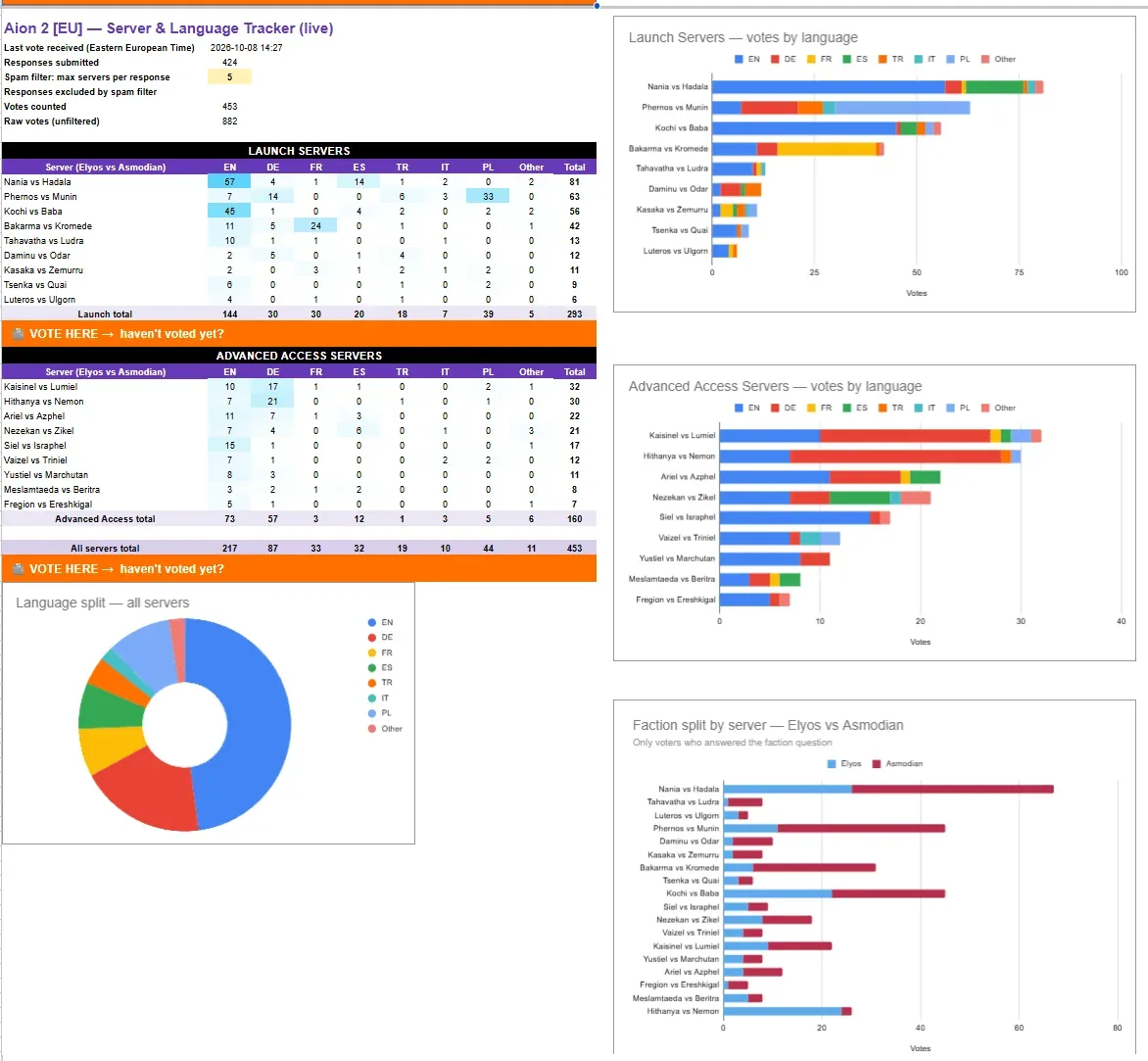
A self-selected community snapshot, not a population census.
The community poll snapshot prepared for the Europe roster was marked as updated at 15:00 GMT+3 on October 8, 2026. Its own discussion shows why the results need caution: participants noted a small sample, languages missing from worlds discussed elsewhere, and disagreement about which servers were primarily English, French, Spanish, Polish, or Turkish. One recruitment sample also found that only a small portion of reviewed guild posts had committed to a launch server at that point.
Use community evidence in layers:
- Start with a guild or friends you already trust. Their declared destination is stronger evidence for your own experience than a broad poll.
- Compare more than one recent community channel. A poll, a legion directory, and active recruitment posts may reveal whether a claimed hub has an organized community behind it.
- Check faction as well as server pair. A poll that combines an Elyos world with its Asmodian opponent can hide which side received each language vote.
- Look at active hours. A server can contain many speakers of your language but still feel empty during your normal schedule.
- Treat labels as tendencies. An unofficial French, Spanish, or English hub can still contain many other languages.
Do not present a self-selected poll result as proof of total server population. Poll visibility, voting time, guild coordination, and faction ambiguity can all distort the apparent ranking.
Population, queues, and creation restrictions
Server load is useful only when its measurement is understood. A percentage displayed by a community tracker may represent reported congestion relative to capacity, not a verified count of unique players. A high percentage at one captured moment does not establish long-term population, market health, or the fastest group formation for every activity.
Separate these server states:
- Online means the server is available at the checked moment.
- Maintenance or offline concerns current service availability.
- Busy or full describes load or congestion.
- Creation restricted means new characters cannot currently be created there, even though existing characters may still log in.
- Faction balance compares the paired sides; it is not the same as the population of one home server.
Live status belongs on the dedicated AION 2 Server Status page, while detailed responses to a blocked character creation belong on the AION 2 Creation Restricted page. For the initial choice, the important lesson is simpler: verify status and creation access shortly before the whole group commits.
Avoid choosing only by the highest visible load. A busy server can offer a large community but may also bring queues or creation restrictions. A lower-load option may be easier to enter, but a single snapshot cannot predict its future activity. Friends, faction, reliable connection quality, and an organized legion are stronger long-term signals than one changing percentage.
Global, Korea, Taiwan, Steam, and PURPLE
Global, Korea, and Taiwan are separate services rather than three interchangeable server regions. Global officially launched on October 5, 2026, after paid Early Access began on September 30. The earlier Launch Scale Test and Early Access period have ended, so an Advanced Access label attached to an older server group describes its history, not an active head-start requirement.
Global currently runs on Windows PC through Steam and PURPLE. Both Global PC launchers provide the same game content and share servers. Choosing Steam does not automatically place a character in North America, and choosing PURPLE does not identify Korea, Taiwan, or a particular Global region.
Korea and Taiwan have their own services and also have mobile clients. That does not establish mobile support for Global. Likewise, an existing Korean or Taiwanese character should not be assumed to move to Global. If a friend already plays outside Global, confirm whether joining that separate service is actually possible and practical before downloading or purchasing anything.
Region also means service eligibility, not merely converting a launch or maintenance time into your local clock. A player near a regional boundary should check actual availability and connection performance instead of treating a familiar time zone as proof that the service is intended for their location.
Final check before character creation
Before confirming a character, read the destination back in one line: service, region, faction, and server. Then verify that the character-creation button is available for every new group member.
For a solo player, choose a suitable Global region, test the real connection, select the preferred faction, and then choose an open server with a community that fits the desired language and schedule. For a group, coordinate first and optimize second. A theoretically better server is not useful if it leaves the party divided across regions, factions, or home worlds.
Next Guides
Coordinate faction choice and distinguish creation capacity from service incidents.