
AION 2 Global has launched, so start from the current official site rather than an old pre-register result. Separate newsletter signup from launch-reward eligibility and check the campaign's in-game delivery terms.
Check the current Global signup and reward panel.
As of October 10, 2026, the Global English home page offers Play now on Steam and Join the Newsletter. The reward area is labelled Launch Rewards. Search results and underlying page labels can still contain pre-register language, but those words alone do not establish an active historical campaign or a new entitlement. Identify the exact offer before deciding which action you need.
Identify what you are trying to register for
Three actions are often grouped together in search results: creating a game account, subscribing to publisher emails and qualifying for a promotional reward. They are different actions. Creating an account establishes access to the publisher's account service; newsletter signup concerns messages; a reward follows the conditions of the named campaign.
Steam wishlisting adds another separate action. It can help you follow the game through Steam, but it does not automatically prove publisher newsletter completion or eligibility for every reward. The current newsletter panel explicitly labels the Steam wishlist statement optional. Do not turn that optional statement into a universal launch requirement.
Before proceeding, name the result you want. If you want to play Global, use the current download and account route. If you want emails, use the newsletter route. If you are looking for a reward mentioned before launch, find the corresponding campaign terms and compare them with your qualifying action. This keeps you from completing one flow while expecting the result of another.
A screenshot of an old signup page can be useful historical evidence, but it does not show what is available today. Check the current publisher page and its campaign wording. Avoid supplying personal information to a mirrored form simply because it resembles an earlier promotion.
Recognize the current official entry
Open the official AION 2 English site for Global. On the teaser home page, the Steam action is presented as Play now, while the email action is Join the Newsletter. The latter leads to a consent panel beside the Launch Rewards artwork. Use the visible current wording to identify the action rather than relying on a search snippet.
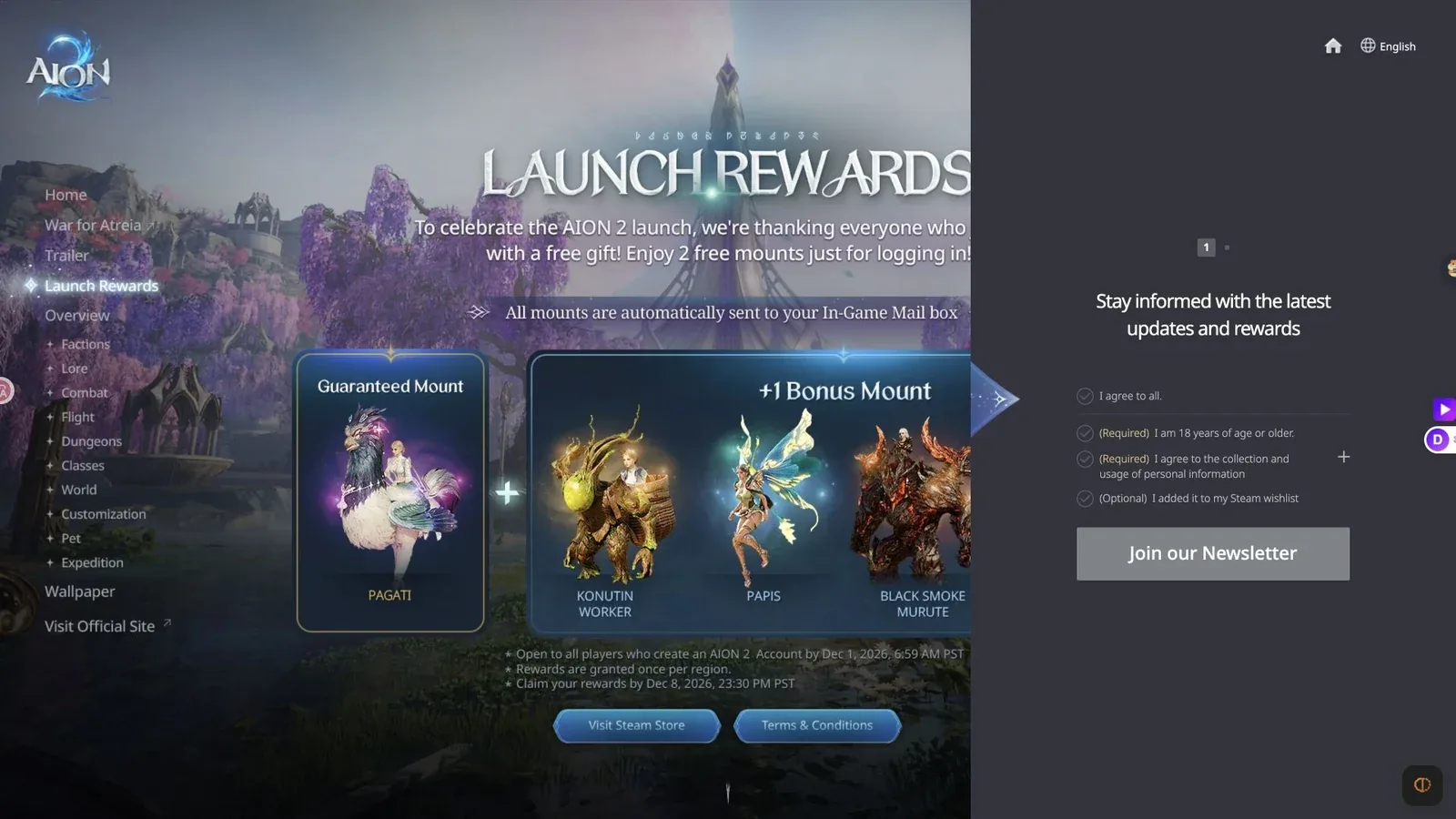
Current launch-reward terms and newsletter consent are separate actions, even though they share a section.
The screenshot shows the current reward section and newsletter consent panel before submission. Their placement side by side does not make them one qualifying action. The panel's required age and personal-information declarations concern continuing through that form; the gift artwork has its own terms and in-game delivery description.
The underlying accessibility label can include both Pre-register and Join our Newsletter. That mixed label is not enough to prove a pre-launch campaign is open after launch. The visible current entry and the particular terms remain the practical guide to what the action does.
Use the official main site's News and Events areas when a campaign requires further detail. An announcement can identify dates, regions, qualifying accounts and delivery instructions that a landing-page button does not fully explain. Read those conditions before treating an old headline as a reward promise.
Read the current launch reward conditions
The publisher's current launch presentation describes two free mounts for logging in: a guaranteed mount and one bonus mount. It says mounts are automatically sent to the in-game mailbox. The artwork separates the guaranteed mount from the bonus presentation.
Read the campaign terms to understand which bonus is delivered and how the offer applies to your region. Do not interpret a picture of several bonus options as a promise that every pictured mount will arrive together. The headline describes two mounts, so the artwork should not be expanded into an unsupported larger bundle.
The official launch presentation includes an account-creation deadline, a separate claim deadline and a once-per-region condition. These are distinct eligibility boundaries. An account made after a stated deadline cannot be assumed to qualify merely because the art remains visible. Likewise, qualifying in time does not remove a separate requirement to claim within the campaign's period.
Check the exact dates and time zone on the terms page for your service. The Japanese English-language publisher page also presents this launch campaign with JST deadlines. Do not copy those wall-clock times into a Global account decision without checking the corresponding Global terms. Different displays of a campaign must be read in their stated region and time zone.
Check the correct account and region
Use the account connected to the character on which you expect delivery. An email subscription address, a Steam account and a publisher game account are related only as established by their actual account flows. Receiving an email at one address is not evidence that a different game account met a reward condition.
The once-per-region language also means you should distinguish a service region from an individual character. Do not assume that every new character receives a fresh copy of an account or region-limited gift. Read the campaign's delivery scope and compare it with the characters you have already used there.
If you played Korea or Taiwan before Global, keep that earlier account history separate from Global launch qualification. A regional pre-registration or early character-creation campaign can have its own dates and rewards. Participation there does not automatically transfer a promotional entitlement to the Global service.
Before contacting support, record which service and region you are asking about. A precise description such as a missing Global launch mount is more useful than saying only that your pre-register reward is absent. It helps identify the campaign rather than sending the request toward an unrelated regional promotion.
Look for delivery in the in-game mailbox
For the current launch mounts, the publisher describes automatic delivery to the in-game mailbox. Start there after meeting the stated login and account conditions. An email inbox is a different destination and is not where the page says the mount itself is delivered.
Inspect the mailbox and the relevant message contents before concluding that an item is missing. Distinguish receiving a message, claiming its attachment and recognizing the resulting item or collection entry. Those are separate stages. Do not assume that seeing the reward artwork on the website performs any of them.
Keep the current claim period in mind. If the campaign requires claiming before a deadline, leaving an eligible reward unclaimed is not the same as securing it permanently. Read the message and campaign instructions while the offer is active rather than relying on an old screenshot of the announcement.
This guide does not establish a universal delivery delay or a hidden mailbox refresh command. If the expected message is not present, check your account, region and terms first. Use the actual game and official support instructions instead of repeatedly creating characters or trying undocumented commands to force delivery.
Handle a historical pre-registration claim
If you participated in an earlier campaign, identify it by name and service. Retain the confirmation or other evidence that its process provided. Compare that evidence with the campaign's required action and qualification period rather than assuming that any publisher email proves participation in every pre-launch offer.
Look for the original reward terms or the publisher's delivery announcement. A pre-registration campaign can use a different delivery method from current launch rewards. Follow that specific instruction. Do not invent a redemption code, claim URL or account-transfer method when none is described for the offer.
A current newsletter form cannot retroactively establish that you registered during an earlier qualification period. Conversely, an old signup confirmation does not prove that your present account is subscribed to the current newsletter. Keep both records identifiable so they answer the appropriate question.
If the available material does not show the historical campaign's conditions, treat its reward eligibility as unresolved. The current Global site is enough to find current actions, but not enough to reconstruct every past regional offer. Use official support to clarify a specific entitlement rather than replacing missing conditions with a general promise.
Distinguish pre-registration from pre-download
Pre-download means obtaining game files before gameplay becomes available. Early character creation means using a creation period before the broader service opens. Neither term automatically describes newsletter subscription or a promotional reward qualification.
An official NCSOFT announcement from November 2025 described a November 16 pre-download through PURPLE and a November 19 gameplay start for the earlier service launch. That schedule is historical regional information. It should not be followed as an October 2026 Global signup instruction or treated as evidence that Global still requires pre-download registration.
The same distinction applies to promotional access and purchases. A download entry does not identify every entitlement attached to a paid package, and a package description does not automatically state the newsletter process. Follow the named product or campaign when the question concerns access, items or payment.
If an old guide tells you to wait for a pre-launch creation window, compare its date and service with the currently launched Global client. You may be reading an accurate historical guide to the wrong event. The correction is to choose the current service route, not to assume that the publisher changed every old campaign retroactively.
Use the newsletter form only for the email goal
For email updates, open Join the Newsletter and read the consent choices. The current panel includes required age and personal-information declarations plus an optional Steam wishlist statement. Complete the live form only if you want that subscription and can truthfully make the required declarations.
Inspect the form's completion response. A disabled button before required choices are made is not proof that a reward campaign closed. An unsuccessful signup is also not proof that your game account cannot log in. These are different systems with different conditions.
If the process requests a confirmation action, follow the official message and keep the result. The initial panel alone does not establish every later screen or promise that a marketing email arrives immediately. Check the live instructions rather than relying on an old pre-register walkthrough with a different form.
When you later manage email preferences, use the authentic newsletter's own management route. Unsubscribing from messages should not be treated as a method of relinquishing or claiming game rewards. Similarly, receiving a launch mount does not prove you completed the newsletter signup.
Report a missing reward precisely
A useful support request names the campaign, region, qualifying account action and missing item. Explain whether the in-game message is absent, present without the expected attachment or already claimed but the result cannot be found. Those observations help distinguish delivery from claim and recognition problems.
Use the official support entry on the publisher's site. Do not send account passwords or authentication codes to another player offering to recover a promotion. Private account access is not a legitimate substitute for campaign eligibility or official assistance.
The reliable route is to identify the offer, read its current terms, check the correct account and region, then inspect the stated delivery destination. For AION 2 pre register searches after Global launch, that sequence is more useful than repeating an old registration flow and expecting every past reward to follow automatically.
Sources and verification
Reviewed for Global on October 10, 2026. The current Global launch page takes priority. The Japan page is a separate regional reference, and the NCSOFT news item concerns the historical 2025 regional pre-download rather than a current Global registration window.
- AION 2 | Your Saga Takes Flight
- AION2|The official global teaser site
- News - NCSOFT Announces Pre-Download for AION 2 Beginning November 16 - NC